
Every few months there's a new "ultimate list" of AI tools for content creators. Most of them are organized the same way: a numbered listicle, loosely sorted by popularity, with a paragraph of hype for each tool and an affiliate link at the bottom.
That's not what this is.
If you're a newsletter writer, blogger, YouTuber, podcaster, or freelance writer trying to figure out which AI tools are actually worth adding to your workflow, the most important question isn't "which tools are popular?" It's "which jobs do I need help with?" Tools should follow jobs. This guide is organized that way.
What Content Creators Actually Need from AI
There's no single "creator stack." A podcast editor's toolkit looks completely different from a newsletter writer's, which looks different from a video essayist's. Format determines which tools are worth your money.
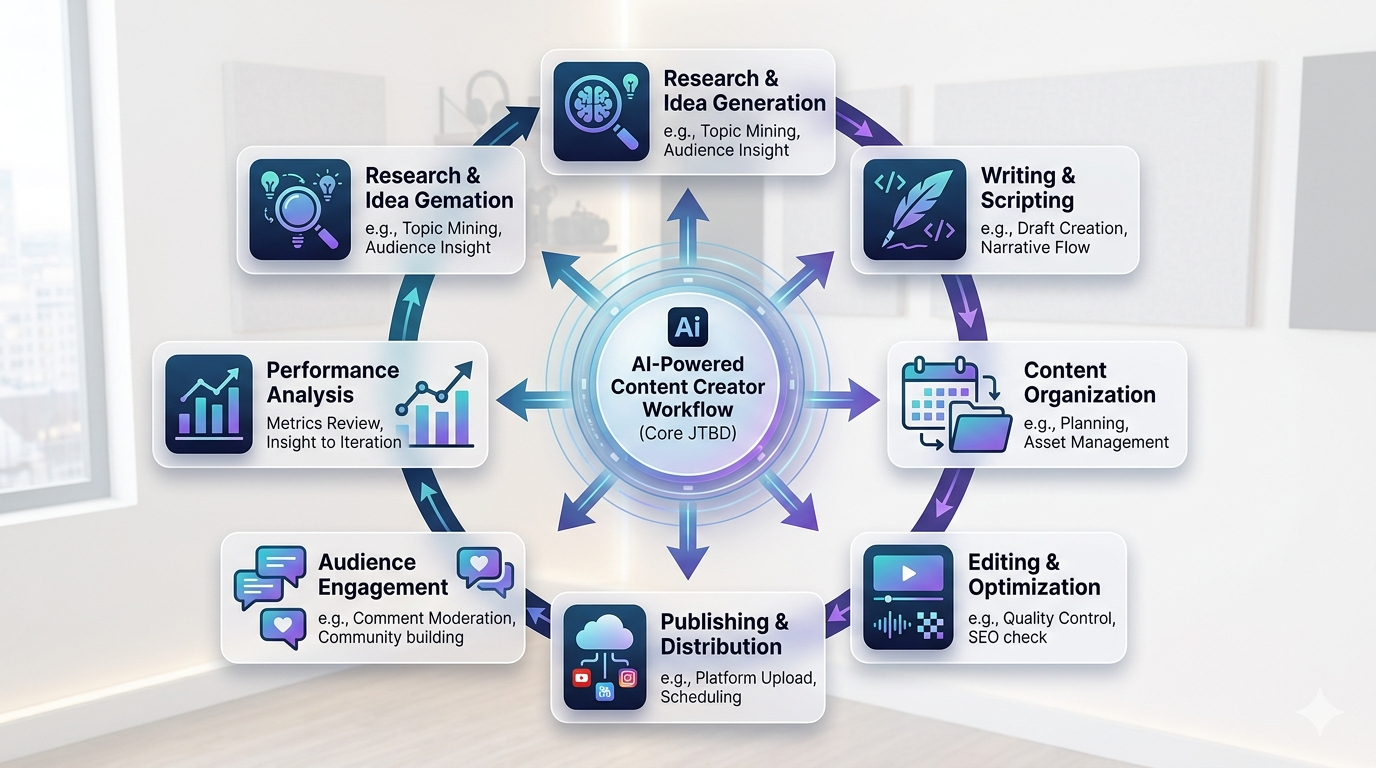
That said, there are jobs that almost every content creator needs to do regardless of medium:
- Capture ideas as they come — a fleeting thought, a quote from something you just read, a topic angle that hits you at 11pm
- Research a topic and find credible sources you can actually cite
- Draft and edit — the actual long stretch of work
- Organize an editorial calendar so nothing falls through the cracks
- Distribute content across the right channels
- Maintain a portfolio or personal site without paying a developer
- Review analytics without spending an hour in a dashboard
The mistake most creators make: they tool up before they understand which jobs are actually painful. They see a new AI writing assistant, subscribe on day one, then realize their real bottleneck is research or distribution or the fact that all their drafts are scattered across three different apps.
Map your jobs first. Then pick tools.
AI Tools by Job-to-Be-Done
Below is an honest look at the tools worth considering, organized by what they actually do. Pricing is current as of early 2026 — verify before committing, since this space moves fast.
Drafting & Editing
This is where most creators start — and where the most tools compete. The honest answer: the generalist AI writers are good enough for most drafting work. The differences matter at the margins.
| Tool | Pricing | Best For |
|---|---|---|
| ChatGPT | Free / $20/mo (Plus) | Generalist drafting; strong free tier; good for ideation and outlines |
| Claude | Free / $20/mo (Pro) | Long-form writing with more nuanced voice; handles context-heavy drafts well |
| Grammarly | Free / $12/mo (Pro) | Grammar and style checking; pairs well with any drafting tool |
| Hemingway Editor | Free + paid | Readability scoring; good for tightening dense prose |
Most creators pick one primary drafting AI — ChatGPT or Claude — and don't need both. Claude tends to produce less generic-sounding long-form content; ChatGPT has a stronger free tier and wider ecosystem of custom GPTs. Try both free tiers before paying for either.
Research & Source-Finding
The research tools have gotten genuinely useful in the last year. The main distinction: web-search AI tools (Perplexity, ChatGPT Browse, Claude with search) are best for current events and synthesizing multiple sources. Academic tools are better when you need peer-reviewed citations.
| Tool | Pricing | Best For |
|---|---|---|
| Perplexity | Free / $20/mo (Pro) | Web research with inline citations; faster than manual searching for most JTBD |
| Elicit | Paid | Academic literature search; extracts data from papers; strong for evidence-heavy content |
| Google Scholar | Free | Academic search baseline; no AI layer, but free and comprehensive |
| ChatGPT / Claude (browse) | Included in Plus/Pro | General research within your primary drafting tool; reduces context-switching |
For most blog and newsletter content, Perplexity's free tier handles the majority of research jobs. If you publish in health, science, or policy — areas where source credibility matters a lot — Elicit earns its subscription cost.
Idea Capture & Workspace
This is the category that separates creators who feel in control of their content from those who are constantly searching for that link they saved three weeks ago. The workspace tool is the connective tissue of your entire stack.
| Tool | Pricing | Best For |
|---|---|---|
| hk3k | Free (no credit card) | AI workspace: research, notes, tasks, and personal site in one place; Notion + ChatGPT + Claude imports; agent loop builds whole projects from one prompt |
| Notion | Free + paid | Central docs, content calendar, project tracking; strong for teams and structured workflows |
| Obsidian | Free | Local-first notes; no cloud sync on free; excellent for long-form thinkers who own their data |
| Mem | Paid | AI-powered note-taking with automatic linking; good for unstructured capture |
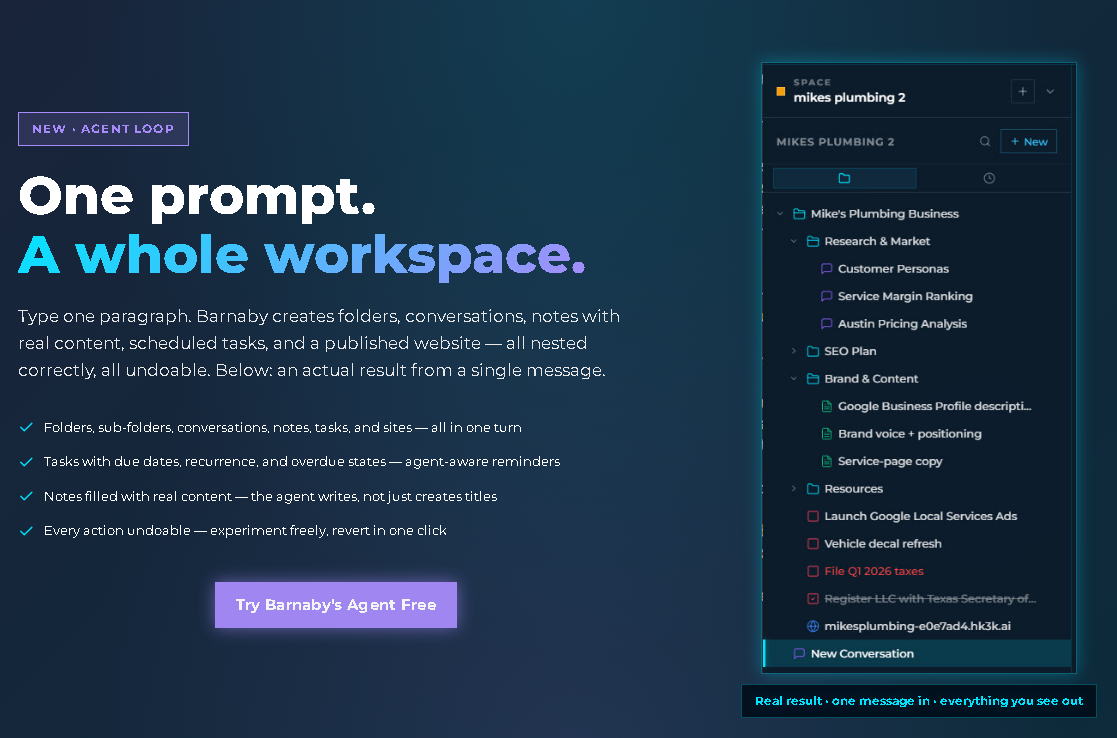
hk3k takes a different approach than most workspace tools: it's built around an agent loop workflow, where you can type "I'm launching a newsletter on sustainable tech — set up a Space for it" and hk3k instantly creates a structured workspace with folders, outline notes for key issues, and a launch task checklist — all from a single prompt. Everything is editable and undoable before confirmation. Your imported ChatGPT conversations, Claude chats, and Notion content are all searchable in the same workspace.
Notion is the right call if you're collaborating with a part-time editor or VA and need shared databases (see our Notion vs Obsidian comparison for the full breakdown). For solo operators, hk3k's free tier covers everything Notion does for individual content workflows and adds the site builder and agent loop on top.
Audio & Video Production
If you're producing audio or video, this category is non-negotiable. The tools below are focused on AI-powered production work — not just transcription.
| Tool | Pricing | Best For |
|---|---|---|
| Descript | Free + paid | Text-based audio/video editing; remove filler words by deleting text; overdub for audio correction |
| Riverside | Free + paid | High-quality recording with local tracks; AI-powered clip and transcript features |
| Otter.ai | Free + paid | Transcription focused; strong for interviews and meeting notes |
| ElevenLabs | Paid | Voice generation and cloning; useful for narration, accessibility versions, or multilingual content |
Descript remains the most genuinely useful AI tool for podcasters and video creators who edit their own content. The ability to edit audio and video by editing a text transcript is not a gimmick — it changes how long editing takes.
Visuals & Imagery
A note before this section: if your images are going to be used commercially, licensing matters. Adobe Firefly is the safest choice for commercial use because it's trained on licensed content. Midjourney and DALL-E have different terms — read them before publishing.
| Tool | Pricing | Best For |
|---|---|---|
| Midjourney | $10/mo+ | Best image quality for editorial/conceptual work; Discord-based interface; commercial use on paid plans — check current terms |
| DALL-E (in ChatGPT Plus) | Included in Plus | Convenient if you're already in ChatGPT; useful for quick illustrations |
| Canva | Free + paid | Design + AI features; best for social graphics, thumbnails, and templates |
| Adobe Firefly | Paid | Properly licensed AI image generation; safest for commercial publishing |
Social Distribution & Scheduling
Distribution tools don't get enough credit in AI tool roundups. Publishing consistently across platforms is genuinely time-consuming, and scheduling tools pay for themselves quickly.
| Tool | Pricing | Best For |
|---|---|---|
| Buffer | Free tier + paid | Clean scheduling across platforms; analytics on free tier; best value entry point |
| Hootsuite | Paid | Broader social management with team features; overkill for solo creators |
| Hypefury | Paid | Twitter/X focused; good for thread scheduling and engagement automation |
Newsletter & Blog Platform
The platform tool is your publishing home base. This is worth getting right — migrating subscribers is painful.
| Tool | Pricing | Best For |
|---|---|---|
| Substack | Free (revenue share on paid tiers) | The easiest way to start a newsletter; built-in discovery; limited customization |
| Beehiiv | Free + paid | Newsletter with built-in growth tools, referral programs, and better analytics than Substack |
| Ghost | Paid / self-hostable | Newsletter + blog; cleaner writing experience; more control; best for creators who want to own their platform |
| WordPress / Medium | Free + paid | WordPress for complete control; Medium for built-in audience discovery |
If you're starting from zero, Beehiiv's free tier has a better growth toolkit than Substack without the revenue share. If you want maximum control and already have an audience, Ghost is worth the subscription.
Your Own Site (Portfolio, Landing Page, Link-in-Bio)
Every creator needs a home base that isn't a rented platform. The site builder landscape has changed a lot — see the AI website builder guide for the full breakdown of AI-first versus AI-bolted-on options.
| Tool | Pricing | Best For |
|---|---|---|
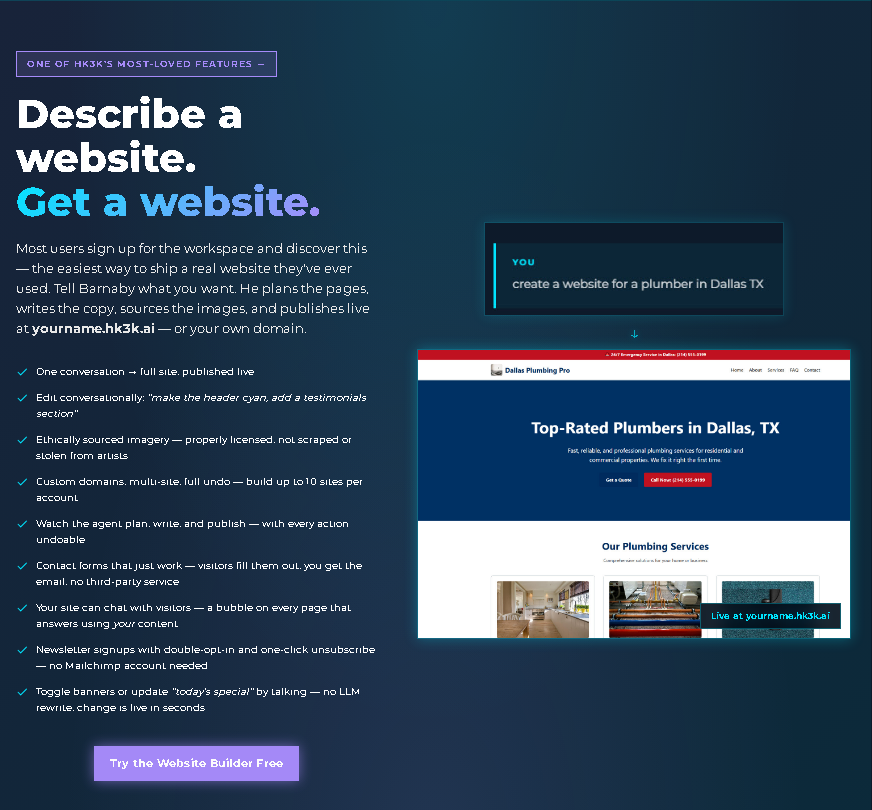
| hk3k | Free | Describe your site, get a published site; conversational editing; up to 10 sites per account; yourname.hk3k.ai or custom domain; no separate subscription needed if you're already using hk3k as your workspace |
| Framer | $10/mo+ (annual) / $15/mo (monthly) | Designer-friendly AI builder; best-looking output; steeper learning curve |
| Wix AI | $17/mo+ | Full-featured with AI builder; AI is bolted on to an existing builder rather than native |
| Carrd | Free / from $19/yr (Pro Standard) | Single-page sites; very fast; good for link-in-bio and simple landing pages |
The hk3k site builder is worth mentioning separately: if you're already using hk3k as your content workspace, building your portfolio or link-in-bio page inside it means your site and your content research and your drafts all live in the same place. You can update your site in the same interface where you write. No switching apps, no separate subscription.
A Sample Stack — One Newsletter Writer's Setup
Here's how a real content workflow looks when the tools are chosen by job rather than by hype. This is a 5,000-subscriber tech newsletter writer. The tools are specific; the logic is transferable.
- Beehiiv for distribution. Free tier handles the first year; better growth tools than Substack without the revenue share. (Or Substack if you prefer simpler setup.)
- hk3k as the central workspace (app.hk3k.ai). Every issue lives as a Space: a folder for research notes, a folder for drafts, a folder for published issues, and a task list for the editorial checklist. Past issues are searchable by concept, not just title. Personal landing page also built in hk3k, so there's no separate site subscription.
- Claude (or ChatGPT) for ideation and drafting. Better at maintaining a consistent voice over long-form content than most alternatives.
- Perplexity for fact-checking and source-finding. Faster than manual searching for tech topics; citations are easy to verify.
- Notion (optional) for the editorial calendar when working with a part-time editor. Not needed for solo operators.
- Buffer for cross-posting issue headlines to Twitter/X and LinkedIn. The free tier handles this job completely.
Total monthly cost: $0 if staying on free tiers across all of the above. The first tool worth paying for, as the newsletter grows, is probably Beehiiv (for the referral and growth tools) — not another AI writing tool.
The key point: the workspace tool is the connective tissue. Without hk3k or something like it, drafts get lost in ChatGPT history, source links get buried in browser bookmarks, and the editorial calendar lives in a Google Doc nobody updates. The workspace doesn't do the writing — it keeps everything findable.
Want to try this setup? hk3k is free at app.hk3k.ai — the workspace, site builder, and agent loop are all included.
Where hk3k Fits for Content Creators
hk3k is a web app at app.hk3k.ai — not a browser extension or desktop download. It's positioned as an AI workspace: the place where research, drafts, idea capture, your editorial calendar, and (optionally) your portfolio site all live together under one AI that knows about all of it.
What that looks like in practice for a content creator:
- Spaces (always capitalized) work as your workspace tree — one Space per series, project, or publication. Each Space can contain folders, notes, tasks, and a site.
- Agent loop: type "I'm launching a newsletter on sustainable finance — set up a Space for it" and hk3k generates a structured workspace with folders, starter outline notes for the first few issues, and a launch task checklist — all from a single prompt. Everything is editable and undoable before confirmation.
- Import your history: bring in 500+ ChatGPT conversations, Claude exports, or your Notion workspace via OAuth. Everything becomes searchable inside hk3k.
- Site builder included: up to 10 sites per account, published at yourname.hk3k.ai or a custom domain. Describe the site you want; edit it conversationally. Images on hk3k-built sites come from a properly licensed, creator-compensated library. No scraped art, no AI imagery from unlicensed sources.
- Privacy levels: control personalization and storage on a per-conversation basis — three modes from normal to full privacy.
- Telegram bot: chat with your workspace and receive task reminders from any phone via @hk3k_bot — no need to open the app.
- Scheduled tasks: set due dates and recurrence; reminders surface in-app and via Telegram when things are due.
hk3k is currently free with no tier restrictions — no credit card required.
The honest pitch: if you're already paying for Notion to organize your content and a separate site builder for your portfolio, hk3k replaces both — and adds the agent loop on top.
Free at app.hk3k.ai — no install, no credit card. Your research, drafts, tasks, and site in one place.
How to Choose Your Stack (Without Over-Tooling)
Most content creators have too many tools. Here's a simple framework:
- Start with the medium. Newsletter, blog, podcast, video, or multi-channel? The format determines your platform tool first. Everything else is secondary.
- Add tools by JTBD, one at a time. Don't add a tool unless there's a specific job that's painful without it. "I heard this tool is good" is not a job.
- Audit every 30 days. If you haven't opened a tool in a month, cancel it. Tool subscriptions accumulate silently.
- Free tiers are enough to start. For the first year of most creator workflows, the free tiers across ChatGPT, hk3k, Canva, Substack or Beehiiv, and Buffer are genuinely sufficient. Pay for what saves measurable time, not what's trending.
The cheapest viable stack: ChatGPT (free tier) + hk3k (free) + Canva (free) + Beehiiv (free) + Buffer (free). That's $0/month and covers drafting, workspace, visuals, newsletter distribution, and social scheduling.
Related Guides
If you're new to the AI workspace concept, start with our AI Workspace 2026 Guide for a deeper look at how workspace tools work and why they matter for solo knowledge workers.
For a full breakdown of the site builder landscape, see the AI Website Builder Guide — it covers the difference between AI-first and AI-bolted-on builders, and when each is worth the cost.
Choosing between the two biggest names in workspace tools? Our Notion vs Obsidian comparison walks through when each one wins.
FAQ
Do I need a separate AI tool for each job?
No. Many tools overlap significantly. ChatGPT with browse handles both drafting and research. hk3k handles workspace, idea capture, and site-building. Start with fewer tools, not more. Specialized tools only earn their place when a specific job is genuinely painful with a generalist.
Is it acceptable to use AI in published creator work?
Yes, and the norms are still forming. Most audiences are fine with AI assistance for research and editing; the places where disclosure matters most are when AI is generating the core perspective or creative voice, not just assisting. Be honest about your process with your audience — it tends to build trust rather than erode it.
Does AI replace the actual creative work?
No. It accelerates the parts of the job that aren't the creative work — research synthesis, outline structuring, first-draft generation, image production. The originality, the voice, the editorial judgment — those still come from you. That's what your audience actually subscribes to.
Should I pay for both ChatGPT Plus and Claude Pro?
Most creators don't benefit from both. Pick the one that fits your writing style better and stick with it. Claude Pro is worth the $20 if you do a lot of long-form writing and want more consistent voice. ChatGPT Plus is worth it if you use custom GPTs or image generation regularly. Running both is usually redundant.
What's the cheapest complete stack to start with?
ChatGPT (free) + hk3k (free) + Canva (free) + Beehiiv or Substack (free) + Buffer (free) = $0/month. This covers drafting, workspace and site, visuals, newsletter publishing, and social distribution. It's a completely functional stack for year one.