The phrase "AI workspace" is showing up everywhere, but so is confusion about what it actually means. Is it a smarter Notion? A fancier chatbot? A second brain? Something else entirely?
This guide answers those questions directly. It covers what an AI workspace is (and isn't), which tools actually qualify, how they differ from each other, and how to decide which one belongs in your stack. No hype, no filler — just an honest survey of a new category.
What Is an AI Workspace?
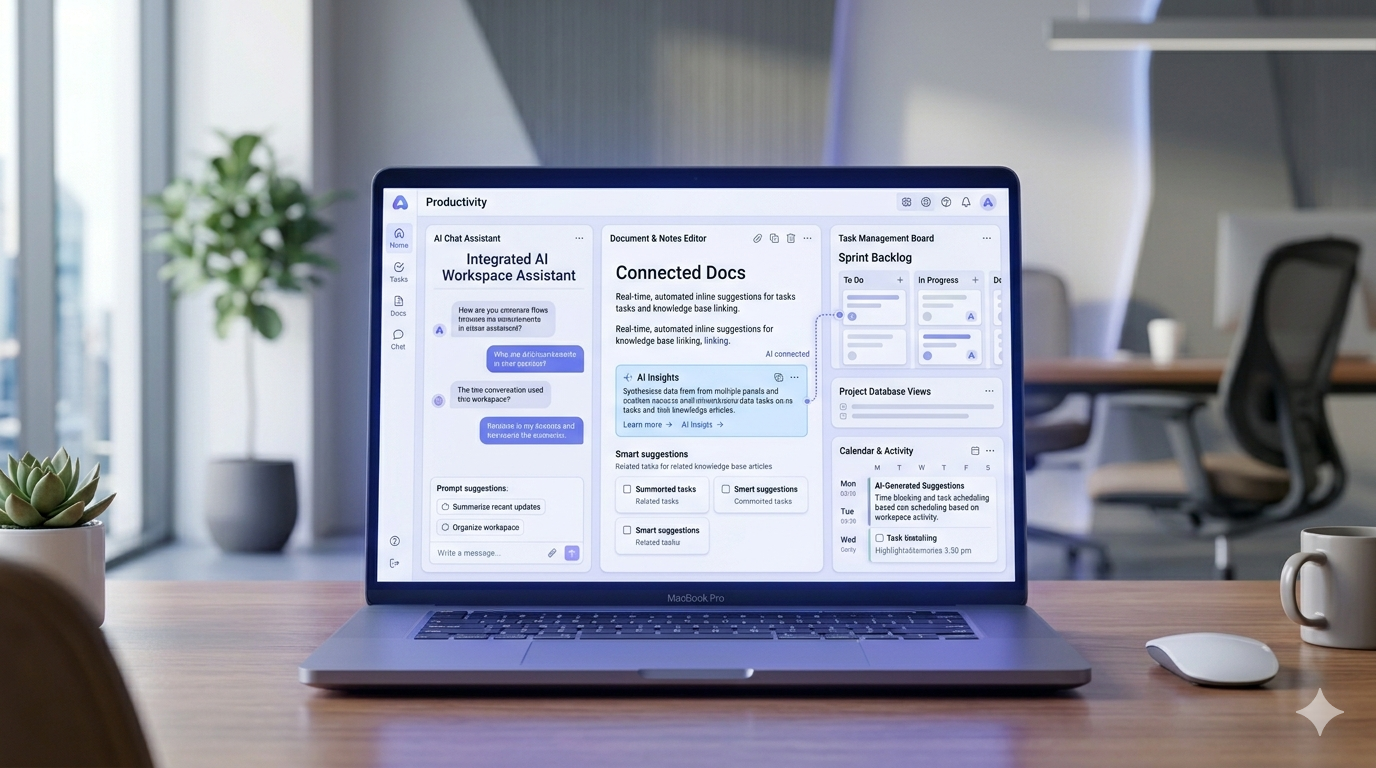
An AI workspace is a persistent environment where AI runs across your work, not alongside it. It's a place where your conversations, notes, tasks, files, and sometimes websites all live together, and where one AI layer has context over all of them, not just the current session.
That definition rules out a lot of popular tools that often get lumped into this category. It's worth being clear about the distinctions, because many readers arrive here having already tried one of these neighbors:
- Standalone AI chatbots (ChatGPT, Claude.ai) — here, AI is the product. But there's no persistent workspace. Each session (or project) is relatively isolated. The AI can't see your notes app, your to-do list, or your files unless you explicitly paste them in.
- AI search and research tools (Perplexity, Elicit, Consensus) — these are exceptional at pulling answers from the web or academic literature with citations. But nothing you do there persists or organizes itself. Your work doesn't live there.
- Notes apps (Obsidian, Apple Notes) — these are workspaces in the traditional sense, but the AI layer is absent or bolted on via plugins. They're tools for organizing thinking, not for AI-native thinking.
- Workspace tools with AI as a feature add-on (early Notion) — Notion evolved from a workspace tool into one with AI features layered on top. The distinction matters: AI-as-add-on versus AI-as-the-unifying-layer are architecturally different products.
- Single-task AI tools (Cursor for code, Midjourney for images) — narrow and excellent at what they do, but scoped to one task type, not a workspace.
Why the category emerged: Most knowledge workers have ended up with five or six separate tools — a chatbot, a notes app, a task manager, a docs tool, maybe a website platform. Each one does its job in isolation. The AI in your chatbot doesn't know what's in your notes app. The AI in your notes app doesn't know about your tasks. An AI workspace is a response to that fragmentation: one place, one AI, full context.
Core Capabilities of an AI Workspace
Not every AI workspace hits all of these, but these are the capabilities that define the category:
- Persistent memory — Your work history is the AI's context. Not session-by-session recall, but a running knowledge base that grows as you add to it. When you ask "what did I decide about the client proposal last month?" — a real AI workspace can answer that.
- Cross-source AI search — Find anything across imports, conversations, notes, and uploaded files in a single query. This is fundamentally different from search inside a single app. The more fragmented your existing information, the more valuable this capability becomes.
- Agent capabilities — "Agentic AI" means AI that takes action, not just describes action. In the workspace context: creating folders, writing notes, scheduling tasks, building and publishing content — from a single prompt. Not just "here's a plan"; actually executing the plan.
- Built-in or integrated content types — Notes, tasks, and (in some tools) websites or databases live natively inside the workspace, rather than requiring a separate app for each.
- Connections to existing tools — The best AI workspaces meet your data where it already lives. That means things like Notion sync via OAuth, ChatGPT and Claude conversation imports, and file uploads (PDFs, Word docs, spreadsheets).
The Best AI Workspaces in 2026: An Honest Survey
This category is new and still evolving fast. Most of the tools below have been live for less than two years. That means feature depth, stability, pricing, and included AI capabilities are still changing rapidly. Because these platforms evolve frequently, always check each provider's official documentation and pricing pages for the latest details before making decisions.
Notion AI
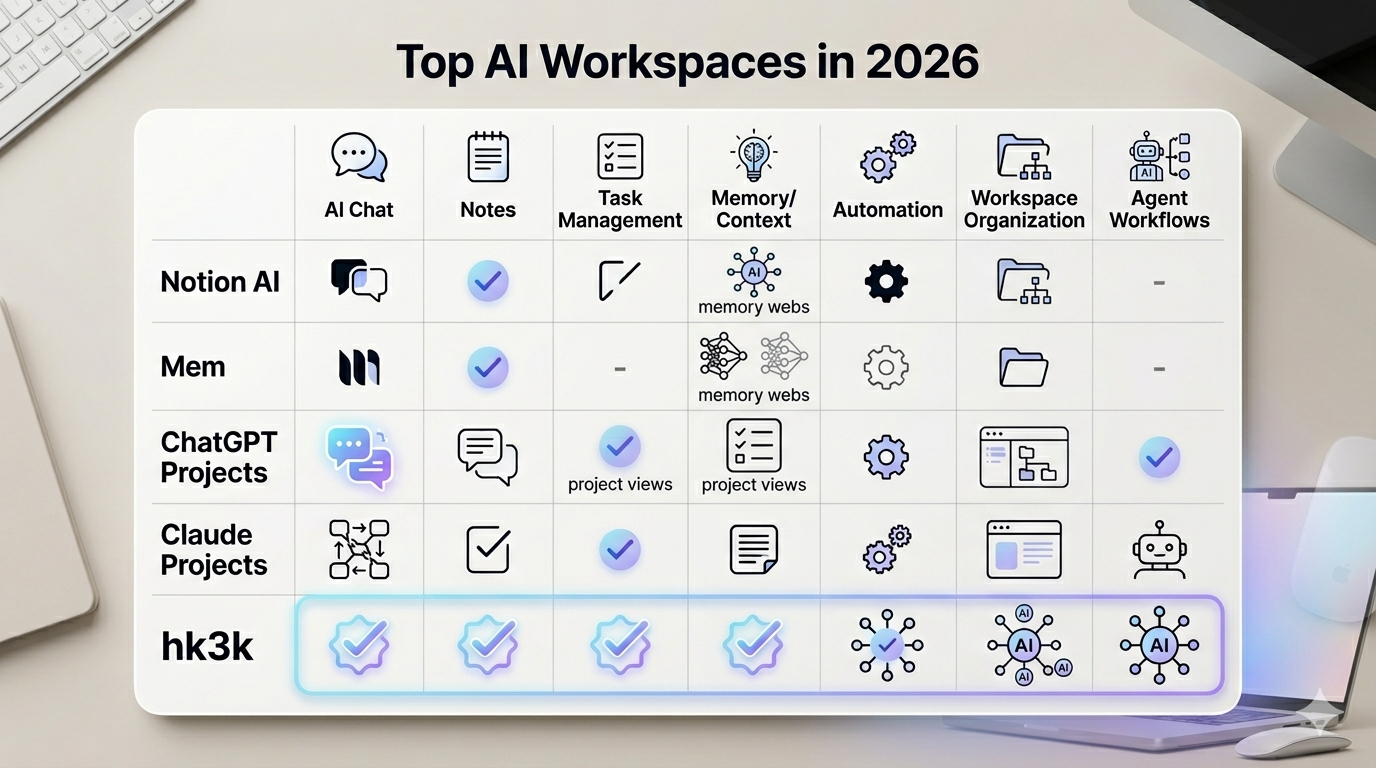
Notion is one of the most polished workspace products ever built. An extraordinarily flexible tool for notes, docs, databases, wikis, and project management. Notion AI layers writing assistance, in-page Q&A, summaries, and increasingly agent-like workflows on top of that foundation.
Business and Enterprise plans include advanced AI capabilities such as AI search, AI meeting notes, and workflow assistance that can help draft documents, retrieve information from databases, and automate parts of workspace management from natural-language prompts. Notion AI search lets you ask questions in plain English and get answers grounded in your actual workspace content rather than the open web.
The limitation worth noting: Notion AI's context remains largely Notion-centric. Enterprise Search can extend into connected tools like Slack and Google Drive, but it still does not function as a universal search layer across your entire digital life. If most of your knowledge already lives inside Notion, that may not matter. If it doesn't, you'll likely notice the limitation. (If Notion is your capture tool of choice, our Notion Web Clipper guide covers how the native clipper fits in, and where it falls short.)
Pricing (May 2026): Notion AI is included in Business plans at approximately $20/user/month when billed annually or $24/user/month when billed monthly, while Enterprise pricing remains custom. Free and Plus plans receive more limited AI access and trial allocations. The standalone Notion AI add-on for new customers was retired in 2025, although some legacy subscribers retain grandfathered access. Pricing, limits, and included AI features may change over time, so confirm current details directly through Notion's official pricing documentation.
Best for: Teams and individuals already deeply invested in Notion who want AI integrated directly into their existing workspace.
Mem
Mem is one of the most AI-native note-taking tools available. Where Notion asks you to build structure, Mem removes much of that requirement entirely: at its core, Mem captures whatever you throw at it. Fleeting thoughts, meeting notes, daily reflections, and uses AI to surface connections, suggest tags, and group related ideas. There's no folder hierarchy to maintain and no taxonomy to design upfront. The system adapts to your content over time.
Major updates released through 2025 and 2026 significantly improved Mem's speed, AI capabilities, and stability. Mem can record and transcribe meetings, surface relevant notes automatically, and answer questions from your knowledge base through Mem Chat.
The tradeoff: Mem is more note-focused than project-management-focused. If you need structured databases, advanced task systems, publishing tools, or broader workspace management, you'll likely pair Mem with another platform.
Pricing (May 2026): Mem's paid plans generally start around $10–$15/month depending on plan structure and billing frequency. Because pricing, limits, and AI features evolve frequently in newer AI products, check mem.ai directly for the latest plan information.
Best for: Knowledge workers who generate a high volume of notes and want AI to organize and retrieve information automatically.
ChatGPT with Projects
ChatGPT's Projects feature is the closest a standalone chatbot gets to becoming a workspace. You can pin files, provide persistent instructions, and maintain context across conversations within a project — actually useful if ChatGPT is where much of your thinking, drafting, and brainstorming already happens.
The limitation is structural: ChatGPT Projects is still fundamentally a chat interface. There are no nested folders, no standalone note system outside conversations, limited structured task management, and no native publishing layer. It's a better-organized chatbot rather than a fully developed workspace platform.
Pricing (May 2026): ChatGPT offers multiple consumer tiers including Free, Go (approximately $8/month), Plus ($20/month), and higher-usage Pro plans reportedly ranging from roughly $100–$200/month depending on usage limits and access levels. Because OpenAI updates plans and AI capabilities frequently, verify current pricing and tier availability directly through official OpenAI documentation.
Best for: ChatGPT power users who want persistent context within their chat workflow but are not yet looking for a complete workspace platform.
Claude with Projects
Claude's Projects feature operates on a similar model to ChatGPT Projects: persistent context, file uploads, and reusable instructions that remain available across conversations within a project. Anthropic has invested heavily in long-context reasoning and nuanced instruction-following, making Claude particularly strong for research, writing, and analytical workflows.
The same structural limitations apply: no nested folders, no standalone note system outside chats, limited task management, and no publishing layer. Claude Projects functions more like a persistent, context-aware chatbot than a complete workspace environment.
Pricing (May 2026): Claude's standard paid tier is approximately $20/month, with discounted annual billing options and higher Max tiers available for heavier users with expanded limits. As with most AI products, pricing and plan structures may evolve over time, so confirm current details directly through Anthropic's official pricing pages.
Best for: Claude users who prefer Anthropic's models and want persistent project context within a chat-first workflow.
hk3k
hk3k is an AI workspace where conversations, notes, tasks, and websites live together inside a unified tree structure called Spaces. The core idea is an agent-style workflow: describe a project in natural language, and hk3k can generate folders, notes, tasks, and even websites that remain editable and reversible before final confirmation.
What it does:
- Spaces — a workspace tree where folders, conversations, notes, tasks, files, and websites live together under a shared AI layer
- Agent-style workflows — one prompt can trigger coordinated actions such as creating folders, drafting notes, scheduling tasks, and generating website structures
- Built-in AI website builder — describe a site in plain English; hk3k plans pages, writes copy, sources images, and publishes at yourname.hk3k.ai or a custom domain. Up to 10 sites per account.
- Notion integration via OAuth — connect Notion workspaces and search across imported or connected information alongside hk3k content
- ChatGPT and Claude history imports — import large volumes of conversations so previous chats become searchable context
- File imports — PDFs, Word documents, Excel files, CSVs, and images
- Personalized AI search — search across conversations, connected tools, uploaded files, and workspace content
- Telegram bot access — interact with your workspace through Telegram
- Privacy controls — multiple memory and retention modes for different types of work
- Scheduled tasks with reminders — get notified inside the app or via Telegram.
hk3k is designed primarily for individuals rather than large collaborative teams. Compared to mature platforms like Notion, it is still early-stage and evolving quickly, particularly around collaboration and enterprise-oriented workflows.
Pricing: hk3k currently offers a free browser-based experience with no installation required. Freemium tiers, feature limits, and expanded plans are expected to evolve over time as the platform develops.
Best for: Individuals who want conversations, notes, tasks, and websites connected inside one AI-assisted workspace instead of split across separate tools.
Other Tools Worth Knowing
- Tana — A powerful outliner-based workspace with AI features built in. Heavily structured, with a steep but rewarding learning curve. Popular with power users who think in nodes.
- Reflect — A networked note-taking tool with an integrated AI assistant. Clean, fast, and privacy-conscious. More notes-focused than full workspace.
- Coda AI — Coda sits closer to the spreadsheet/database end of the spectrum, with strong AI features layered on top. Excellent if you work heavily with structured data.
- Anytype — A local-first, privacy-focused workspace alternative. Slower AI development than cloud-native options, but valuable for users who prioritize data ownership.
A Note on Adjacent Tools: Perplexity
Perplexity deserves a mention because many people shopping for an AI workspace arrive having already tried it — and for good reason. Perplexity is an exceptional AI-powered research and search engine: ask it a question, get a well-sourced answer synthesized from the web with citations. It's one of the best "answer this from the internet" tools available.
But Perplexity is not a workspace. Nothing you do there persists or organizes into a knowledge base. You can't import your ChatGPT history, connect your Notion, or build a task list. It's a research tool, not a home for your work.
The honest framing: use Perplexity for research. Use an AI workspace to organize and remember what the research turned up. They complement each other well.
Quick Comparison Table
How to Choose an AI Workspace
The fastest way to narrow this down is to start with your job-to-be-done:
"I want AI search across everything I already have"
→ Notion AI (if virtually everything lives in Notion already) or hk3k (if your knowledge is scattered across Notion, ChatGPT, files, and other sources)
"I want AI that does work, not just describes work"
→ hk3k's agent loop is currently the most complete implementation of this in the workspace category. Also worth watching: agent-first tools that are emerging rapidly.
"I want one tool to replace five"
→ An all-in-one workspace like hk3k. Honest caveat: no tool replaces every tool for every person. Know which five you're trying to replace, and verify the replacement actually covers them.
"I want AI inside my notes, specifically"
→ Mem (most AI-native notes experience), Notion AI (if you're already in Notion), or hk3k (if you want notes as part of a broader workspace).
Other decision factors to weigh:
- Is the free tier sufficient for your use? Most tools in this category have meaningful free tiers or trials. hk3k is free with no credit card. Notion offers a free plan but full AI requires the Business tier. Mem has a free tier; paid starts around $10–15/month (verify at mem.ai).
- Where does your existing knowledge already live? If 90% of your information is in Notion, a tool with deep Notion sync (or Notion itself) is probably the right starting point. If it's scattered — ChatGPT, files, email — a tool that can ingest from multiple sources makes more sense.
- Are you comfortable with cloud-only? The AI workspace category is almost entirely cloud-based. If local-first data ownership is a hard requirement, your options narrow significantly — Anytype and Obsidian are the main alternatives, though they're not AI-native in the same way.
- Do you need team collaboration? Most AI workspaces in this category are personal-first. Notion is the strongest option for team use. hk3k is currently designed for individuals.
For a deeper look at how Notion and Obsidian compare as workspace foundations, see our dedicated Notion vs. Obsidian comparison.
How hk3k Approaches the Workspace
hk3k's organizing idea is simple: everything in one tree, one AI that knows all of it. Your Spaces hold folders, conversations, notes, tasks, files, and websites — and the AI layer runs across all of them simultaneously. There's no context-switching because there's nothing to switch between.
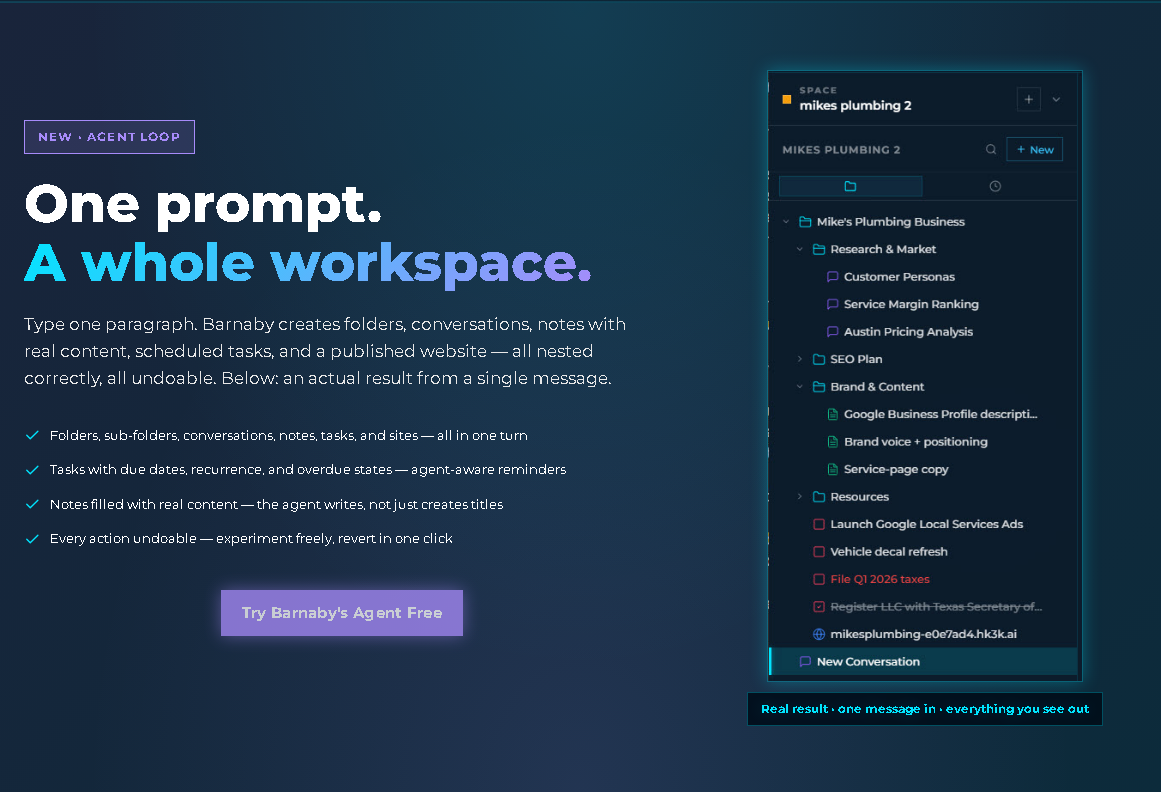
The agent loop is the most concrete expression of this. Here's what it looks like in practice: you type one paragraph describing a project — say, "I'm launching a consulting service for e-commerce brands focused on reducing returns. I need a landing page, a project tracker, and notes on my positioning." hk3k interprets that description and creates a nested folder structure, populates notes with the relevant content, schedules tasks with reminders, and builds and publishes a landing page — all from that one prompt. Every action is undoable before you confirm.
The built-in AI website builder is a genuine differentiator in this category. Most AI workspaces don't include publishing at all. hk3k does — describe a site, and it plans the pages, writes the copy, sources images from a licensed creator library (not scraped from the web), and publishes it. You can also import an existing live site by URL and edit it conversationally afterward. More on the AI website builder →
On the import side: connect Notion via OAuth and hk3k's AI search ranges across your Notion workspace alongside everything else. Import 500+ ChatGPT or Claude conversations at once. Upload PDFs, Word docs, Excel files, images. Everything becomes searchable, with citations.
Who it's for: individuals — solopreneurs, researchers, AI-curious professionals — who want one brain for their entire workflow. Who it's not for (yet): teams needing shared collaboration features.
Free at app.hk3k.ai. No install required.
AI Workspaces Are Eating the Productivity Stack
The productivity tool market has been moving toward bundling for years. AI is accelerating that trend significantly.
As AI gets better at multi-step, agentic actions — understanding context, making decisions, taking actions without step-by-step instructions — the structural boundary between "chatbot" and "workspace" starts to dissolve. A chatbot that remembers everything, organizes everything, and acts on your behalf is functionally a workspace. A workspace with AI that can write, research, schedule, and publish is functionally a powerful assistant. The categories are converging.
What this means for users in the near term: more bundling, less context-switching, and increasingly AI-native UX patterns — interfaces designed around conversation rather than menus and dropdowns. The "click to format" paradigm gives way to "describe what you want."
Pricing in the category is still shaking out. Most early entrants launched free or freemium to build user bases; expect more defined paid tiers as products mature and companies need sustainable revenue. The tools that survive will be the ones that earn enough trust to become a user's primary workspace — and that's a high bar.
One honest observation worth making explicit: AI workspaces are new. Most tools in this category have been actively live for less than two years. Feature gaps, rough edges, and changing pricing are normal. That's not a reason to avoid them — the category is real and the tools are actually useful — but it's worth approaching with calibrated expectations rather than expecting the polished depth of a decade-old product.
AI Workspace FAQ
What's the difference between an AI workspace and a chatbot like ChatGPT?
A chatbot is session-based: the AI's context is the current conversation (or project, in tools like ChatGPT Projects). An AI workspace is persistent: your work history, notes, files, and tasks all live there, and the AI has context across all of them continuously. The distinction is the difference between a smart assistant you talk to and a smart environment you work inside.
Can I use multiple AI workspaces at once?
Yes — and many people do. A common setup is using Notion AI inside an existing Notion workspace while also using a second tool (like hk3k) to ingest content from outside Notion. The tools aren't mutually exclusive, and most support imports or integrations that make them complementary.
Do AI workspaces replace Notion or Obsidian?
Sometimes, partially — but not necessarily. If Notion is already the center of your workflow, adding Notion AI may be sufficient. If you're starting fresh or have data scattered across many tools, an AI-native workspace might serve better as a primary hub. Obsidian, with its local-first and privacy-focused model, occupies a different niche; the tradeoffs are architectural, not just feature-based.
How private is my data in an AI workspace?
It varies enormously by tool and plan tier. Notion has contractual agreements with AI subprocessors that prohibit the use of customer data to train their models. Data is encrypted in transit using TLS 1.2 or greater. For Enterprise workspaces, Notion says LLM providers use zero-retention processing, meaning no customer data is stored with providers. For non-Enterprise plans, providers may retain data for up to 30 days before deletion. Other tools have different policies. hk3k offers three privacy modes: normal (level 0), no long-term memory (level 1), and full privacy (level 2) for sensitive conversations.
What if I'm not technical?
Most AI workspaces in this category are designed for non-technical users. Natural language is the primary interface. You describe what you want, and the tool does it. hk3k, Mem, and Notion AI all work without any coding or technical setup. The learning curve is less about technical skill and more about figuring out how you want to structure your work.
Are AI workspaces just hype?
Honest answer: some tools in the category lean heavily on the label without earning it. A notes app that added a "Ask AI" button is not meaningfully an AI workspace. But the underlying category, a persistent environment where AI has context across your work and can act on it — is real, useful, and increasingly differentiated from both plain workspaces and plain chatbots. The quality varies. Evaluate based on whether the specific capabilities (persistent memory, cross-source search, agent actions) are actually present and working, not just whether the marketing uses the right words.