In 2025, searching for "ai website builder" was something only early adopters did. In 2026, it's a 50,000-search-a-month category growing nearly 10,000% year over year. Something clearly shifted.
That something is capability. The early wave of AI website tools were mostly rebranded template pickers — you answered a few questions, a site appeared, and what came out looked like it could have come from any wizard-based website builder from 2015. That's changed. The newer generation of tools does something noticeably different: you describe what you want, in plain language, and the AI writes the copy, plans the pages, sources the images, and publishes — with no drag-and-drop required.
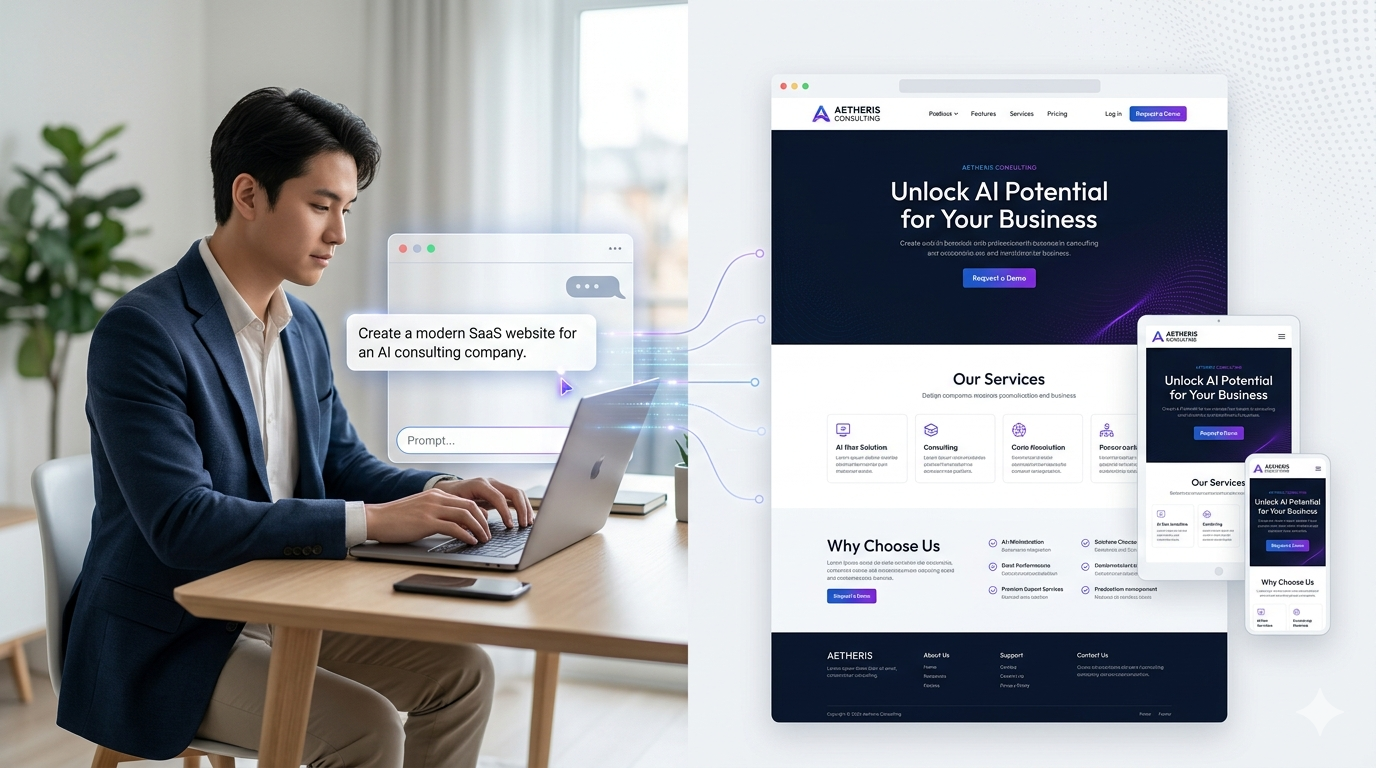
This guide covers how these tools actually work, what distinguishes the good ones from the gimmicks, and which tool is likely to fit your situation. It's meant to be useful whether or not you end up signing up for any of them.
How AI Website Builders Actually Work
The core flow is simpler than the marketing suggests. You describe a site — your business name, what you do, who you serve — and the AI handles the rest: page structure, section layout, headlines, body copy, metadata, and a published URL. That's the basic promise, and most tools deliver at least a version of it within a few minutes.
What's less obvious is where the AI is doing real work versus running a sophisticated template fill. Here's how to read what's actually happening under the hood:
Site Planning
Most tools use the business type you provide to select a standard page structure — a restaurant gets a menu page, a law firm gets a practice areas page, a portfolio site gets a gallery. That's not AI in the generative sense; it's conditional logic. Where genuine AI comes in is in adapting that structure to your specific description: how many service categories to break out, whether a FAQ makes sense, what to name each section.
Copywriting
This is where AI adds the most real value. Given your business description, the AI writes headlines, subheadings, body copy, and CTAs that are specific to you — not generic placeholder text. Quality varies between tools, and most output needs light editing (more on this below), but the baseline is noticeably better than a blank page.
Image Sourcing
Tools differ significantly here. Most pull from stock libraries (Unsplash, Pexels, or proprietary collections). A few generate images with AI. The licensing implications of each approach vary; if you're publishing a professional site, it matters whether your imagery is properly licensed or scraped.
Layout
Here's an honest note: most AI builders do not generate layouts from scratch. They work from a set of predefined section templates — hero, features, testimonials, CTA, footer — and the AI populates them. True generative layout (AI deciding the actual geometry and spacing of a page) is still rare and inconsistent. What you're getting is AI content inside a predefined visual structure.
Publishing
Nearly every tool publishes to a subdomain by default (yourname.toolname.com). Most offer custom domain support at a paid tier. What varies: whether the site is statically hosted or CMS-backed, how well SEO meta tags are handled, and whether the tool generates semantic HTML that search engines can actually index.
What AI Builders Are Good At
It helps to be specific about where this category actually delivers:
- Speed. A working site in under 10 minutes is real, not marketing copy. For a solopreneur who needs an online presence this week, that matters.
- Design coherence. AI-generated sites tend to look more consistent than what most non-designers produce from scratch. The AI keeps fonts, spacing, and color use disciplined across pages.
- Copy as a starting point. Blank-page paralysis is a real obstacle. Having AI-written copy that's 80% of the way there — even if you edit it — is faster than starting from scratch.
- Iteration. If you don't like the output, you regenerate or describe a different direction. That feedback loop is faster than adjusting templates manually.
AI-First Builders vs. AI-Bolted-On Builders — The Real Category Split
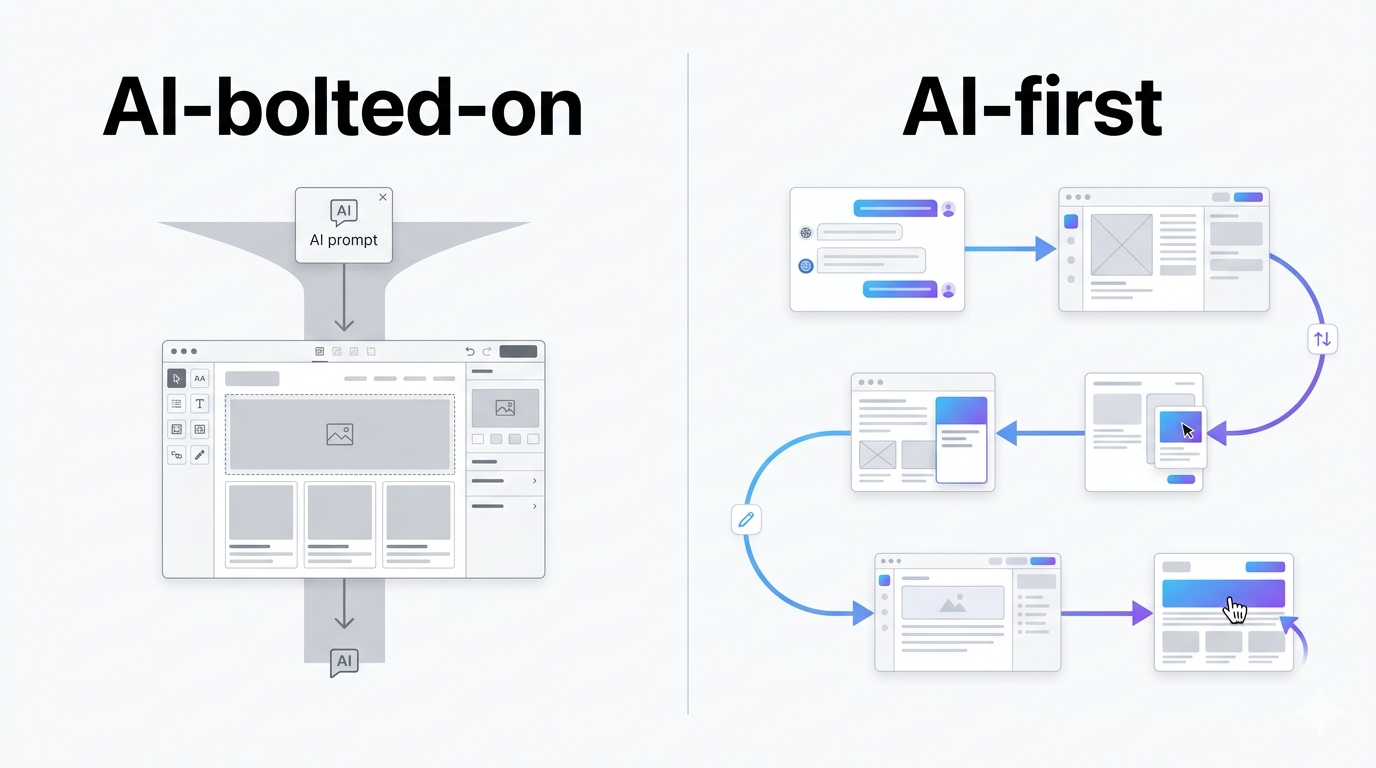
Most people shopping for an AI website builder don't realize they're looking at two fundamentally different categories. Understanding the split will save you hours of frustration.
AI-Bolted-On Builders
This is the pattern you see with Wix AI, Squarespace AI, and most established builders. The AI runs at the very beginning: you answer a set of prompts, the AI generates an initial site, and then you're dropped into the company's traditional visual editor — the same drag-and-drop interface their non-AI customers have used for years. After that handoff, the AI is gone.
There's a structural reason these companies are stuck with this pattern. Wix and Squarespace have millions of paying customers who depend on their existing editors. They can't deprecate those workflows without alienating their base. So they bolt AI onto the front end as a better onboarding experience and leave the rest of the product unchanged. This is the classic innovator's dilemma: the AI is a generator, not a co-pilot.
If you've tried Wix AI, liked the initial output, and then found yourself struggling with the same Wix editor you've always avoided — that's this pattern at work.
AI-First Builders
This is a newer and genuinely different category. Tools like hk3k and parts of Framer keep the AI as the editing surface, not just the generator. Once your site is created, you keep talking: "make the header cyan," "add a testimonials section," "expand services to 10 pages." There's no handoff to a legacy UI; the conversational interface is the editor.
What this enables: you can iterate rapidly without ever learning a tool's interface. What this gives up: you're trusting AI for layout decisions that a visual editor would give you direct control over. AI-first builders are improving at this fast, but if you need pixel-perfect manual control over every element, they'll frustrate you.
This distinction matters more than any individual feature comparison. Picking the right category first saves significant time.
What AI Builders Aren't Good At (Yet)
Honest limitations matter — here's where the current generation falls short:
- Highly custom designs. Most AI builders converge on similar layouts. If your brand requires something structurally unusual, you'll fight the tool.
- Complex e-commerce. Full shopping carts, inventory management, and payment processing are mostly beyond current AI builders. They're landing-page tools, not Shopify replacements.
- Pixel-perfect brand control. The AI makes layout decisions. If you need exact control over margin, spacing, or element placement, you'll find yourself working around the AI rather than with it.
- Custom backend integrations. Forms that connect to your CRM, custom webhooks, authenticated portals — not where this category lives yet.
- Long-form content sites. AI builders are optimized for landing pages and small-business sites. A blog with 200 posts, or a site with complex content hierarchies, is a different product category.
- Copy quality. AI copy is a starting point, not a finished product. Most output needs a pass for tone, accuracy, and brand voice before publishing.
The Major AI Website Builders in 2026
An honest survey of what's available, organized by editing model. For each tool, the key signal is whether it's AI-first or AI-bolted-on — that determines your experience more than any other single variable.
Wix AI — AI-Bolted-On
The largest player in the space by user base, and a reasonable default for small businesses that need a site with broad infrastructure support: hosting, domains, SEO tooling, e-commerce, and a large app marketplace are all mature. The AI handles site generation; you edit in Wix's traditional drag-and-drop editor from there.
Best for: templated sites with wide SMB support, especially if you want to add e-commerce or third-party app integrations down the line. Free tier available with Wix branding; paid plans from $17/mo (Light) or $29/mo (Core, required for e-commerce).
Squarespace AI — AI-Bolted-On
Similar pattern to Wix: conversational generation upfront, then Squarespace's traditional editor. Squarespace has historically been stronger on design aesthetics than Wix, and that shows in the AI-generated output — the sites tend to look cleaner on first generation. The ongoing editing experience is the same drag-and-drop all Squarespace customers know.
Best for: creative businesses and portfolios where visual polish at first impression matters. Free trial available; paid plans from $16/mo (Basic) — note Squarespace renamed its plan tiers in late 2025 (old Personal/Business/Commerce names are gone).
Framer AI — Partially AI-First
Framer doesn't fit cleanly into either category. It generates sites conversationally and its editing surface is closer to AI-first than Wix or Squarespace — there's real conversational editing capability — but it also has a visual editor that more design-oriented users will want. High-fidelity output, good motion support, and a strong reputation among designers.
Best for: designers and design-adjacent founders who want AI-assisted building with the option to drop into code or visual editing for fine-tuning. Free tier available; paid from $10/mo (annual billing) or $15/mo (monthly).
10Web — AI-Bolted-On (WordPress)
Builds on top of WordPress, which means you get the entire WordPress ecosystem: plugins, themes, and a large existing knowledge base. AI generates the initial site structure; editing happens in WordPress's familiar admin interface. The main advantage over other AI builders is direct migration path if you're moving an existing WordPress site.
Best for: users already comfortable in WordPress who want AI-assisted setup without abandoning their existing workflow. Paid from $10/mo (annual billing), 7-day free trial.
Hostinger AI — AI-Bolted-On
Budget-friendly with integrated hosting — one of the cheaper entry points in the category. The AI handles site setup; ongoing editing is in Hostinger's website builder UI. Good for cost-conscious users who need a basic presence without lots of features.
Best for: simple sites on a tight budget where hosting and site-building in one invoice matters. Intro pricing starts at $2.99/mo on a 48-month plan (paid upfront); renews at $10.99/mo.
Durable AI — AI-Bolted-On
Positioned specifically at service businesses: plumbers, lawyers, consultants, personal trainers. The AI generates quickly and the output is tuned for that audience — appointment booking hooks, service-area pages, review integration. Less flexible than the broader builders.
Best for: local service businesses that want a fast, vertical-specific site. $22/mo (Launch plan, annual billing).
hk3k — AI-First
The key differentiator here is that hk3k is an AI workspace: your site lives in the same environment as your notes, tasks, and projects. That's a real departure from every other tool in this list, where the website builder is a standalone product.
The editing model is fully conversational throughout: you describe what you want, and the agent plans, writes copy, sources images, and publishes, then you keep talking to iterate. There's no separate visual editor to learn. The agent loop handles the entire build process, including undo if something goes wrong. Imagery comes from a properly-licensed creator library, which matters if you care about your site's image rights.
Site import also works: point hk3k at an existing URL and it'll pull the design and content into your workspace, where you can edit conversationally going forward.
Best for: solopreneurs who want to bundle their website alongside their notes and work, users who've bounced off traditional editors, and anyone building multiple sites who doesn't want to pay per-site. Free at app.hk3k.ai — no install, no credit card required.
Also Worth Knowing
A few tools that don't require full reviews but are worth naming: Mixo (fast landing page generation, lean feature set), Zyro (budget option with decent AI copy), and Gamma (technically a presentation tool, but increasingly used for web-published content). All three are narrower in scope than the tools above.
Quick Comparison
The table below reflects 2026-05 status.
| Tool | Editing Model | Cost | Custom Domain | Images | Conversational Edit |
|---|---|---|---|---|---|
| Wix AI | AI-bolted-on | $17/mo+ | Yes | Stock + AI | Limited — drops to Wix editor after generation |
| Squarespace AI | AI-bolted-on | $16/mo+ | Yes | Stock | Limited — drops to Squarespace editor |
| Framer AI | Partially AI-first | $10/mo+ (annual) | Yes | Stock | Partial |
| 10Web | AI-bolted-on (WP) | $10/mo+ | Yes | Stock | No — uses WordPress editor |
| Hostinger AI | AI-bolted-on | $2.99/mo+ (intro) | Yes | Stock | Limited |
| Durable AI | AI-bolted-on | $22/mo+ | Yes | Stock | Limited |
| hk3k | AI-first | Free | Yes | Ethically licensed | Yes — talk to it for every edit |
How to Choose an AI Website Builder
Match the tool to your actual situation rather than the one with the most features:
- One site, one business, get it done this week: pick the cheapest tool whose default output looks close to what you need. Wix, Squarespace, or Hostinger depending on budget. Don't overthink it.
- You'll build multiple sites over time: look at per-site pricing. Tools like hk3k and Framer are friendlier here than builders that charge per domain.
- You already use Notion, Obsidian, or another workspace for your actual work: a bundle option like hk3k avoids tool sprawl. (For context on workspace foundations, see our AI workspace guide.)
- You want pixel-perfect control: Framer is the best AI option. Webflow if you're willing to invest in the learning curve.
- You're migrating an existing WordPress site: 10Web's migration path is the most direct.
A few decision questions worth running through before you pick:
- Domain: do you need yourname.com, or is yourname.toolname.com fine for now?
- Editing model: are you comfortable in a conversational interface, or do you want direct visual control?
- Image licensing: does it matter where your images come from?
- Existing site: are you starting fresh, or migrating content from somewhere else?
Building a Site with hk3k — A Brief Walkthrough
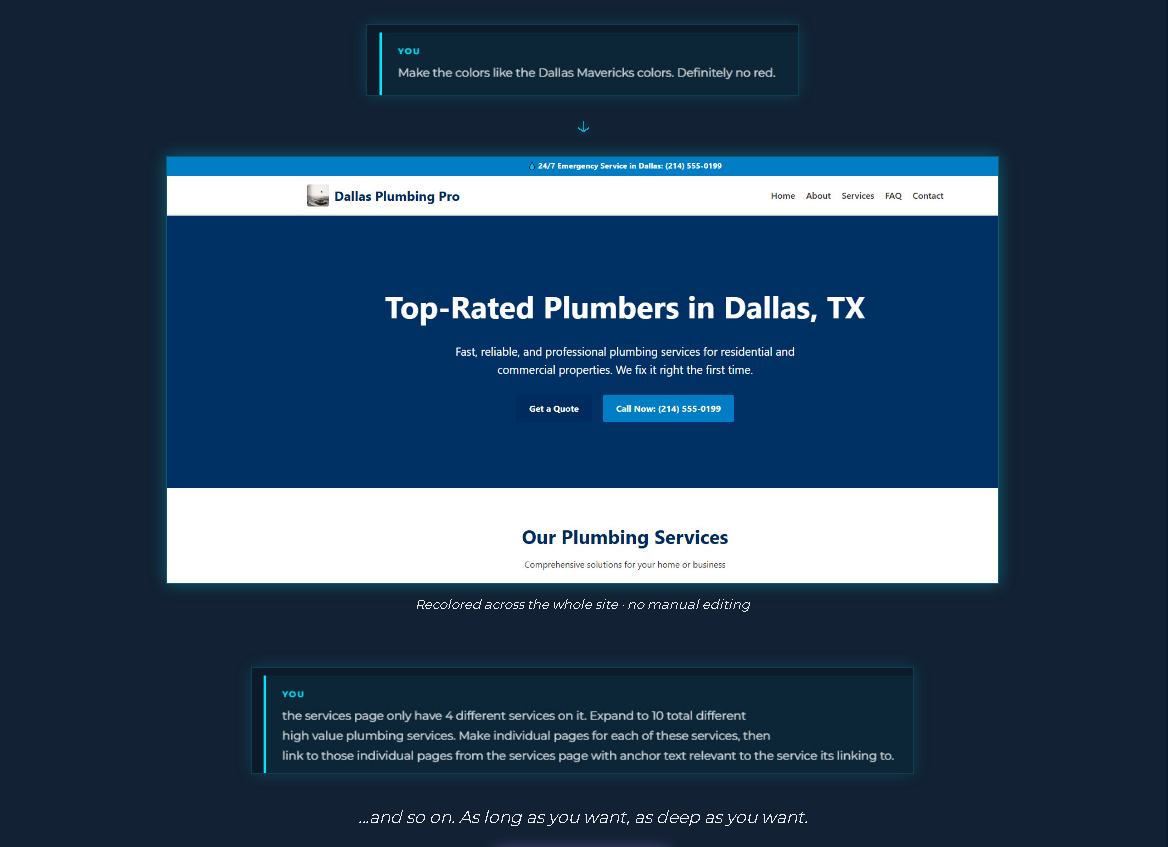
The workflow is different enough from traditional builders that it's worth walking through once. Sign up at app.hk3k.ai — no install, no credit card.
Once you're in, you tell Barnaby (hk3k's optional workspace guide, and you can turn it off if you prefer) what you want to build. Something like: "Build me a landing page for a dog-walking business in Portland." The agent loop kicks off — you can watch it plan the page structure, write copy, source imagery, and publish, all in real time.
Your site goes live at yourname.hk3k.ai immediately. If you want a custom domain, bring your own URL and hk3k handles DNS and TLS. The agent stays in the loop for every edit afterward: "make the header section full-width," "add a pricing page with three tiers," "the CTA should say 'Book a walk' instead of 'Contact us.'"
The undo capability matters here: if the agent does something you didn't intend, you can roll back the entire action rather than trying to manually reconstruct what you had.
One feature worth noting separately: site import. If you have an existing site you want to move, point hk3k at the URL — "import [yoursite.com] into this Space" — and Barnaby pulls the design and content into your workspace. From there, everything is editable conversationally.
The workspace bundling is either a big deal or irrelevant depending on your workflow. If you already use hk3k for notes, tasks, and projects, your website living in the same environment is a meaningful reduction in context-switching. If you just want a standalone site builder, it's a nice-to-have.
For users who want to understand the broader workspace picture — where a website builder fits into an AI workspace that also handles notes, tasks, and project management — the AI Workspace guide covers the full picture.
AI Website Builder FAQ
Are AI-built websites SEO-friendly?
Generally yes, at least for the basics. Most tools generate proper meta tags, semantic HTML headings, and alt text on images. What varies is how much you can customize those elements and how the tool handles structured data. If you're building a content-heavy site that depends on SEO for traffic, verify the tool's specific SEO handling before committing.
Can I use my own domain?
Most tools support custom domains at a paid tier. The exceptions tend to be free plans that restrict you to a subdomain. Check the pricing tiers for the specific tool — some gate custom domains at surprisingly high plan levels.
Will my site look like everyone else's?
There's genuine risk here, and it's more pronounced with the bolted-on builders that pull from a smaller set of templates. AI-first builders that generate layouts more dynamically tend to produce more varied output. Editing afterward — even light adjustments to color, typography, and section order — goes a long way toward making a site feel distinct.
Where do the images come from?
This question matters more than most users realize. Most tools pull from stock libraries (Unsplash, Pexels, or proprietary collections) with standard licensing. A few use AI-generated images with varying licensing clarity. hk3k uses an ethically-licensed creator library. If your business depends on a specific visual identity, you'll likely want to replace at least some AI-sourced images with your own photography anyway.
Can I edit the code afterward?
It depends heavily on the tool. Framer and 10Web both support code access, which experienced developers will appreciate. Most bolted-on builders don't give you direct HTML/CSS control. AI-first builders like hk3k work through the conversational interface rather than code export.
What if the AI gets it wrong?
Most tools support regeneration — if you don't like the output, you describe a different direction and generate again. AI-first builders like hk3k support undo for specific agent actions. The quality of the wrong-to-right feedback loop varies significantly between tools; it's worth testing with a real prompt before committing.
Can I move my site to a different platform later?
This is a real consideration. Many AI builders use proprietary hosting that makes export difficult — you can't just download your site and move it to a different host. If portability matters, check the export options before you build anything substantial. Framer and 10Web (via WordPress) have better portability stories than most.