
Both Notion and Obsidian have earned serious, loyal followings — and both deserve them. They're not rivals trying to solve the same problem; they're two different answers to two different questions. Notion asks: how do you organize a structured, collaborative workspace in the cloud? Obsidian asks: how do you build a personal knowledge system you'll own forever, offline, on your terms.
This comparison is meant to be genuinely useful whether you're considering your first PKM tool, thinking about switching, or just trying to understand what each one is actually good at. The right answer depends on your workflow — and I'll tell you exactly when each one wins.
Quick Verdict (TL;DR)
Pick Notion if you: collaborate with others, rely on structured databases, want a polished cloud product with AI built in, or don't need to own your data locally.
Choose Obsidian if: you think in connected notes, want local-first privacy, love customization through plugins, or care deeply about data longevity and ownership.
The honest truth: both have passionate communities for good reason. If you need structure and collaboration — Notion. If you need depth and privacy — Obsidian. Read on for the full picture.
What Notion Is — and Where It Shines

Notion is a cloud-first, all-in-one workspace built around blocks — text, images, embeds, databases, and pages can all live inside the same document. It runs on browser, desktop, and mobile with real-time sync across every device.
The killer feature for most teams is its relational database system. You can build a CRM, a content calendar, a project tracker, or a personal wiki — all with linked databases, filtered views, and properties that behave more like a spreadsheet than a note. The UI is clean, the learning curve is gentle for basic use, and the template ecosystem is enormous.
As of 2026, Notion AI is included in paid plans (Plus and above) rather than being a separate add-on. Pricing structures may change, so always verify the latest details on Notion's official pricing page. (For a deeper look at how Notion's own clipping extension fits into a knowledge workflow, see our Notion Web Clipper guide.)
Where Notion shines:
- Team collaboration — real-time editing, comments, permission controls, shared databases
- Structured data — relational databases, filtered views, rollups, and formulas
- Low setup overhead — a clean workspace in minutes, no configuration required
- Polished cross-platform experience — desktop, browser, and mobile all feel cohesive
- Integrations — API access, Zapier, Slack, GitHub, and dozens more
What Obsidian Is — and Where It Shines

Obsidian is a local-first, markdown-based note-taking and knowledge management tool. Your notes are plain .md files that live on your hard drive. There's no mandatory cloud account, no vendor lock-in, and the core app is free with unlimited vaults.
The philosophy behind Obsidian is linked thinking. Bidirectional links between notes let you build a genuine web of connected ideas — and the Graph View lets you visualize that web visually. This resonates particularly with researchers, writers, and thinkers who want their notes to reflect how ideas actually connect, not just how they're filed.
Where Obsidian gets really powerful is its plugin ecosystem. Community plugins like Templater, Dataview, Excalidraw, Smart Connections, and Obsidian Copilot turn the base app into whatever knowledge tool you need. The trade-off: more setup, more decisions, more room to get lost in configuration.
Where Obsidian shines:
- Local-first privacy — your notes never leave your device unless you opt into Obsidian Sync
- Bidirectional linking and graph view — build a genuine knowledge network
- Data ownership — plain markdown files that any text editor can open, now and decades from now
- Plugin ecosystem — one of the most active in productivity software; extends Obsidian into almost anything
- Writers and researchers — especially good for long-term, compounding note-taking systems
Head-to-Head Feature Comparison
At-a-glance summary:
| Notion | Obsidian | |
|---|---|---|
| Best for | Teams, structured data, databases | Personal PKM, writers, researchers |
| Data location | Cloud-first | Local markdown files |
| Collaboration | Real-time, multi-user | Single-user focused |
| AI | Bundled into Plus/Business plans | Via community plugins |
| Free plan | Free — unlimited pages | Free — unlimited vaults |
| Offline | Limited (cache only) | Full offline by default |
Full feature breakdown (pricing last checked May 2026):
| Category | Notion | Obsidian |
|---|---|---|
| Pricing — free | Free — unlimited pages (5 MB file upload limit) | Free — unlimited vaults, no file limit |
| Pricing — entry paid | Plus: $10/user/mo (annual) | Sync: $4/user/mo (annual) |
| Pricing — higher tier | Business: $20/user/mo (annual) | Publish: $8/site/mo (annual) |
| Enterprise | Custom pricing available | Commercial License: $50/user/year |
| Sync | Built-in cloud sync on all plans | Obsidian Sync add-on (E2E encrypted, version history) |
| Collaboration | Real-time, fully featured | Limited; primarily single-user |
| Databases | Native relational databases | Via Dataview plugin; less polished |
| Linking | Backlinks; limited graph | Bidirectional links; full graph view |
| AI | Bundled in Plus/Business plans | Via plugins (Smart Connections, Copilot, etc.) |
| Mobile | Polished iOS/Android | iOS/Android; power users prefer desktop |
| Plugins | Limited but growing | Massive community ecosystem |
| Offline | Limited (recent items cached) | Full offline — local-first by design |
| Data ownership | Cloud-only; export available | You own the markdown files |
| Search | Improving with AI; can slow at scale | Fast local search; backlinks always visible |
| Export | Markdown, PDF, HTML | Already markdown |
| Custom domains | Available at extra cost | Via Obsidian Publish ($8/site/mo annual) |
When Notion Wins
Notion is the better choice in most situations where you're not working alone or where structure and organization are the primary goal:
- You collaborate with others. Notion's real-time editing, comment threads, and permission systems are built for teams. Obsidian has no meaningful multi-user story.
- You need relational databases. CRMs, project trackers, content calendars, inventory systems — Notion's database layer handles these elegantly. Obsidian's Dataview plugin can approximate this, but it requires comfort with query syntax.
- You want a polished product with minimal setup. Notion is production-ready on day one. Obsidian rewards customization but can easily become a configuration project in its own right.
- You want AI bundled into your workspace. On the Plus or Business plan, Notion AI is included — writing, editing, summarizing, and Q&A across your pages without an extra subscription.
- You don't need local-first. If cloud sync and cross-device access with no manual configuration sounds ideal, Notion delivers that cleanly.
When Obsidian Wins
Obsidian wins clearly in any situation where depth, longevity, or privacy matter more than polish and collaboration:
- You're building a long-term personal knowledge base. Researchers, writers, academics, and deep thinkers tend to stay with Obsidian for years. The plain markdown format means your notes will survive any software changes.
- Privacy and data control are non-negotiable. If you don't want your notes on someone else's server, Obsidian is the natural choice. Your vault is yours. Obsidian Sync adds end-to-end encryption and version history if you do want cloud backup.
- You want to customize everything. The plugin ecosystem is genuinely extraordinary. You can build a zettelkasten, a personal CRM, a visual canvas, a daily journaling system, or something entirely custom.
- You think in connected ideas, not linear documents. The bidirectional linking and graph view aren't gimmicks — for people who work in networks of ideas, they change how note-taking feels.
- You want your notes to outlast any company. Plain markdown files are effectively immortal. A Notion export is a good safety net; Obsidian's files are the primary source of truth.
When Neither Quite Fits — Considering an AI Workspace
Some people find that both tools leave a gap. Not because Notion or Obsidian are bad — they're not — but because their workflows don't fit cleanly into either mold.
The pattern usually looks like this: you want AI throughout your workspace, not added on as a plan feature or assembled from plugins. You're working across conversations, notes, tasks, and maybe a website — and you want those to be connected by default, not manually synced. You're probably an individual, not a team, and you want something that acts rather than just stores.
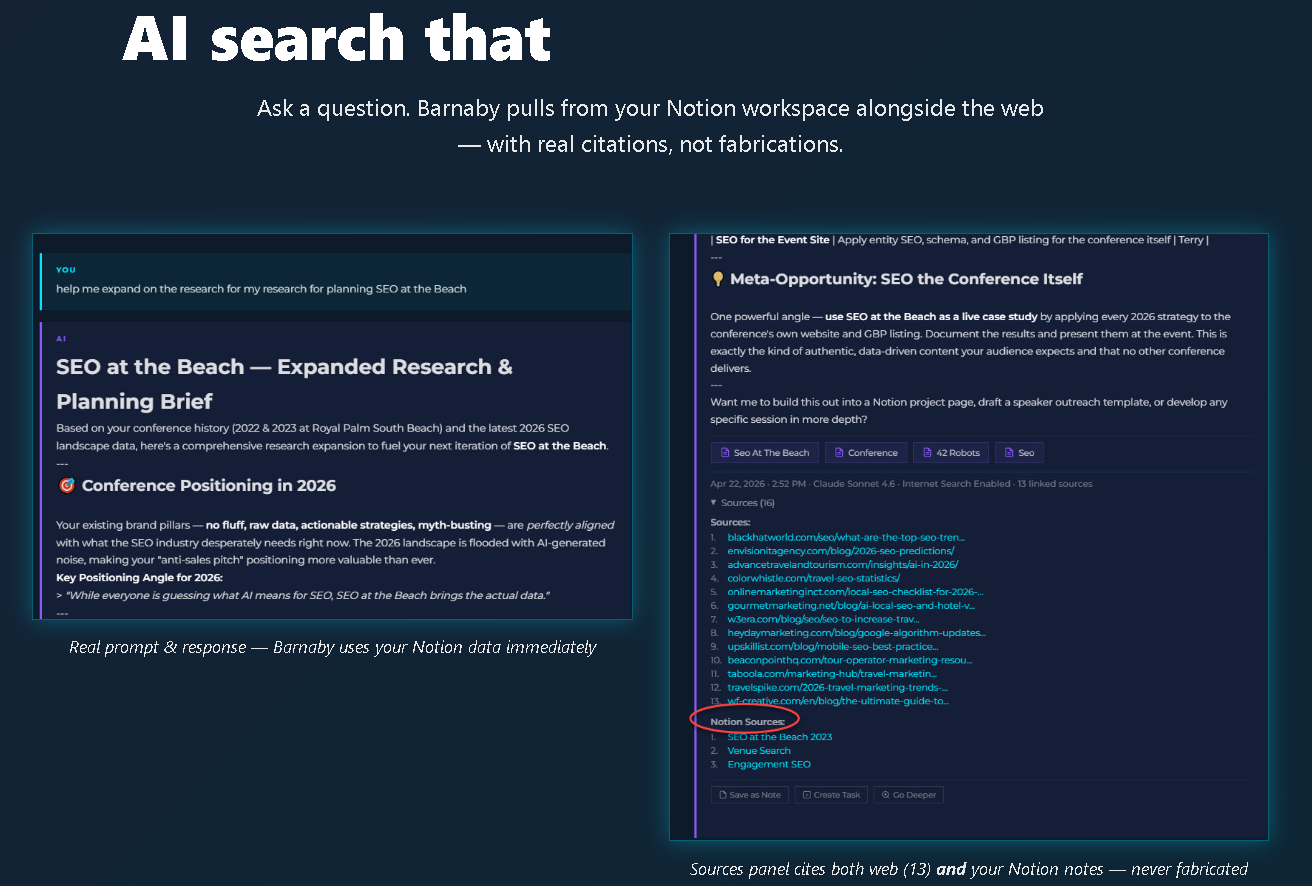
This is a different category from PKM tools. AI workspaces are built around the idea that your AI should be able to take a prompt and produce folders, notes, tasks, and even a published website — not just a formatted document.
hk3k (app.hk3k.ai) is one example of this category. It's a web app where conversations, notes, tasks, and websites all live in the same environment. A few things that distinguish it from Notion and Obsidian:
- Connects to Notion via OAuth — your existing Notion content doesn't go anywhere
- Imports ChatGPT and Claude conversation history (500+ at a time)
- Agent loop that turns one prompt into a full set of organized notes, tasks, and folders — and it's undoable
- Built-in AI website builder (up to 10 sites, yourname.hk3k.ai or custom domain)
- Free to start at app.hk3k.ai, no credit card required
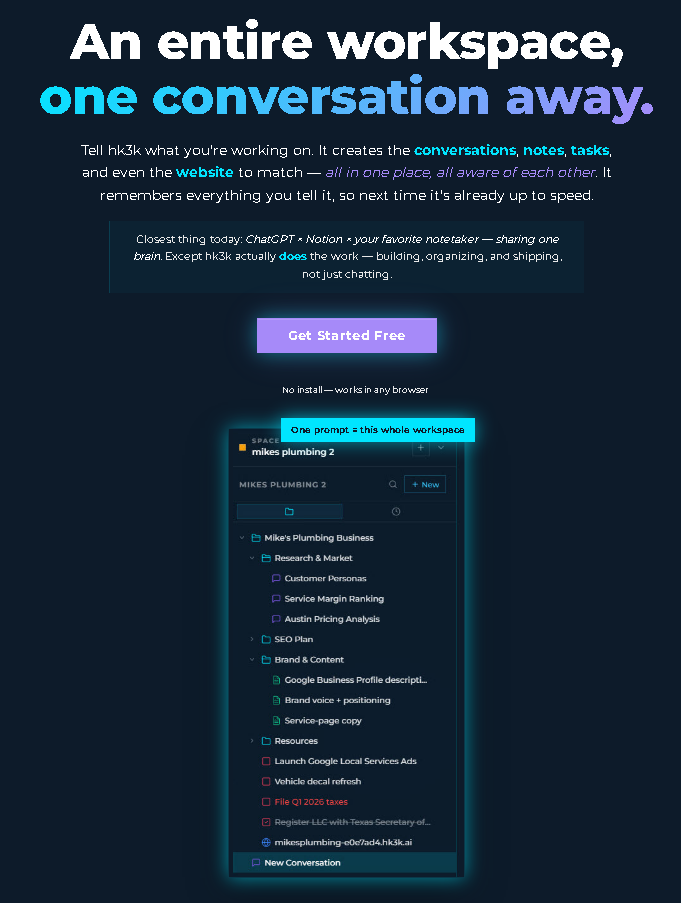
hk3k isn't a replacement for Notion or Obsidian — it's a different tool for a different workflow. Many people use it alongside one or both. If you've ever felt like your notes tool and your AI tool should be the same thing, it's worth a look.
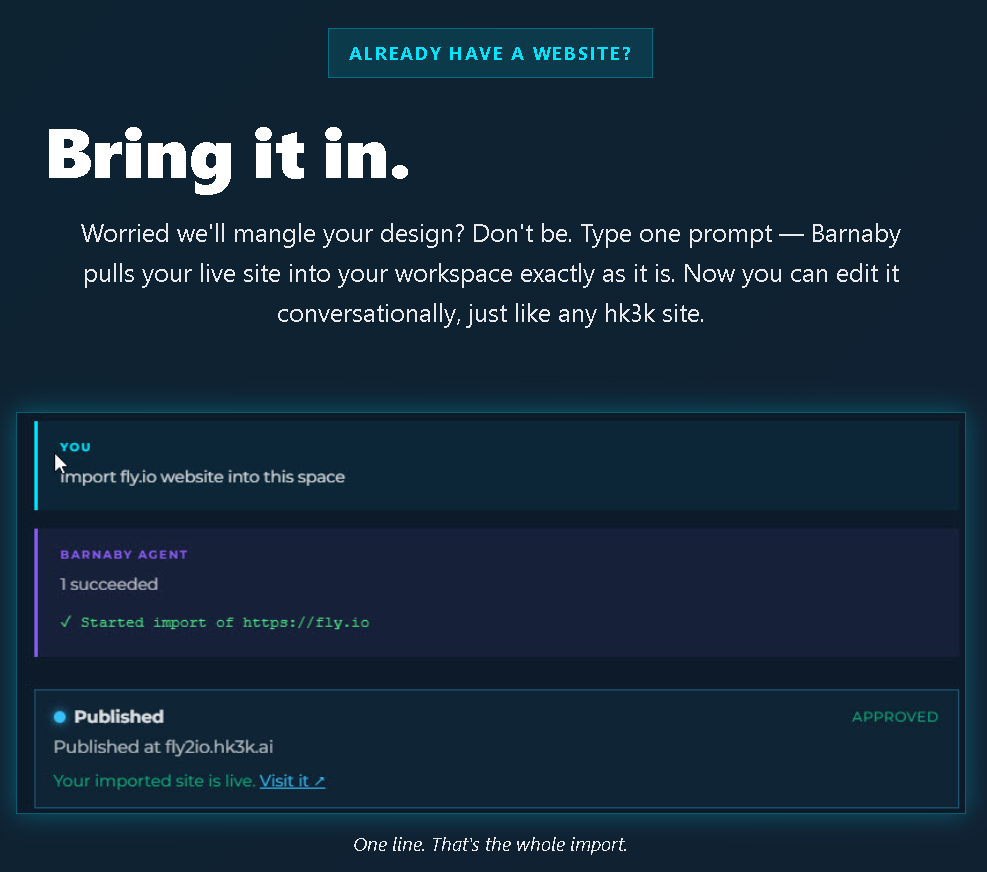
For more on what the AI workspace category looks like, the hk3k AI Workspace guide walks through the concept in more depth.
hk3k is free at app.hk3k.ai — connects to Notion via OAuth, imports ChatGPT and Claude history, no credit card.
Migration and Bridge Notes
Moving from Notion to Obsidian
Export your Notion workspace as markdown (Settings → Export → Markdown & CSV). Import the folder as an Obsidian vault. Common pitfalls: relational database links don't survive the export (you'll get flat lists, not linked tables), embedded images often need path corrections, and Notion's block structure produces some markdown formatting quirks. Several dedicated Notion-to-Obsidian migration guides exist in the Obsidian community forums if you hit edge cases.
Moving from Obsidian to Notion
Less common, and more manual. Notion can import markdown files, but the import doesn't reconstruct Obsidian's bidirectional links or graph relationships — those are structural features, not just formatting. Most people who move in this direction do so because they're joining a team and need collaboration, accepting that their personal PKM stays in Obsidian while team work moves to Notion.
Using Both at Once
Many people do exactly this: Notion for team docs, shared databases, and structured work; Obsidian for personal writing, research, and long-form note-taking. The tools have different strengths and don't overlap much in practice. If your job involves team deliverables and you also maintain a serious personal knowledge base, using both is a completely reasonable answer.
Adding hk3k Alongside Either
Notion integrates via OAuth — one-click connection inside hk3k, and your Notion pages become searchable and usable inside the AI workspace. Obsidian notes can be brought in via markdown file upload. Either way, hk3k doesn't require you to abandon your existing setup.
Frequently Asked Questions
Is Obsidian free?
Yes. The core Obsidian app is free with unlimited vaults for personal use. Obsidian Sync ($4/user/month billed annually, or $5 monthly) and Obsidian Publish ($8/site/month billed annually, or $10 monthly) are optional paid add-ons. Sync includes end-to-end encryption and version history. You can also use iCloud or Dropbox as a free alternative to Sync if you want multi-device access without paying.
What does Notion cost?
Notion's Free plan covers unlimited pages for individuals, with a 5 MB file upload limit. The Plus plan is $10/user/month (annual billing) and includes more collaboration features and Notion AI. Business is $20/user/month (annual) with advanced workspace tools. Enterprise is custom pricing. Notion AI is now bundled into the Plus and Business plans — it's no longer a separate add-on purchase.
Does Notion have an offline mode?
Limited. Notion caches recently opened pages for offline access, but it's not a full offline experience — and you can't create new pages or databases without a connection. If full offline is a requirement, Notion isn't the right fit. Obsidian, being local-first, works entirely offline by default.
Can I use Notion for personal notes, not just teams?
Absolutely. Notion's free tier is genuinely usable for solo work, and many people use it purely as a personal productivity system — journals, note libraries, goal tracking, reading lists. The team features are there if you ever need them, but nothing forces you to use them.
Is Obsidian hard to learn?
The core app is approachable — it's essentially a markdown editor with folders and links. The learning curve gets steeper once you start exploring the plugin ecosystem, which is vast. The Obsidian community is active and helpful, and most people find that starting with the basics and adding plugins gradually works much better than trying to build a complete system on day one.
What about Roam, Logseq, and Tana?
Good tools, all of them — but this comparison focuses on the Notion vs Obsidian decision, which is where most people shopping in this space end up. Roam pioneered the bidirectional-linking paradigm; Logseq is an open-source, local-first alternative; Tana takes a different structural approach to networked notes. If you're deep into the linked-thinking space, each is worth investigating once you've settled on whether you need cloud-and-collaboration or local-and-private.
Will my Notion data transfer to Obsidian cleanly?
Mostly. Notion's markdown export preserves text content and basic structure, but relational database features, linked page properties, and embedded media often don't transfer cleanly. Most people who migrate report a one-time cleanup effort — manageable for a personal workspace, more involved for a large shared database.
Can I have a "second brain" with either tool?
Yes — with either tool, or with both. "Second brain" refers to a method of externalized knowledge management, not a specific app. Obsidian's linking and graph features feel natural for the method, but Notion users build successful second brain systems too. The system matters more than the software.
What about the Notion Web Clipper for saving content?
Notion has a Web Clipper browser extension for saving articles, pages, and highlights directly to your Notion workspace. For more on how web clipping fits into a knowledge workflow, our Notion Web Clipper guide covers the specifics.
The Bottom Line
Notion and Obsidian are both genuinely excellent tools. Notion wins on collaboration, structured data, and polish. Obsidian wins on privacy, ownership, and depth of customization. For most people, the choice comes down to one question: do you need to work with others, or are you building something for yourself?
If you're collaborative and data-driven — Notion. If you're private, detail-oriented, and planning for the long term — Obsidian. And if you want AI throughout your workspace alongside whichever you pick, hk3k is free to try at app.hk3k.ai. It connects to Notion via OAuth, imports your ChatGPT and Claude history, and adds AI search across everything — no credit card required.