How AI Is Changing Student Workflows (Honestly)
Let's skip the hype. AI won't write your dissertation, ace your finals, or replace the three hours you need to actually understand Foucault. But it will save you a meaningful amount of time on the stuff that surrounds real learning — and used well, it makes the learning itself sharper.
Here's what AI is genuinely good at for students:
- Brainstorming and exploration. Prompting a model with "explain X like I'm a freshman who just read the intro chapter" is legitimately useful. You get a scaffold to push against before you form your own view.
- Drafting and editing. AI is a fast, tireless first-draft partner. It won't produce your best thinking, but it can get words on the page so you're editing rather than staring at a blank document.
- Summarizing long readings. Useful for getting orientation before you read — not a substitute for reading the actual source.
- Generating practice questions. One of the clearest legitimate use cases. Feed a chapter summary to ChatGPT and ask for 10 quiz questions. It's a flashcard generator that can handle any material.
- Understanding the shape of an argument. Before you write your own analysis, it helps to quickly map what others have said. AI accelerates that mapping stage.
What AI does not replace:
- Deep reading of primary sources. The friction of working through a dense text is where comprehension actually happens. Outsourcing that reading is outsourcing the learning.
- Original thinking and your own argument. A well-formed argument that's yours is worth more than a polished AI-generated one — to your professors, to future employers, and to you.
- Engagement with your professor and classmates. Office hours, seminars, study groups — these are the education. AI can't replicate them.
- The actual learning. The difficulty is the point.
A Note on Academic Integrity
This is worth being direct about. Most universities have specific AI policies in 2026 — not vague disclaimers, but actual guidelines covering different assignment types. Read yours.
A useful baseline: AI for brainstorming, outlining, and editing is widely accepted. AI as your final voice is widely contested. A simple self-test: Could I defend every line of this in office hours? If not, that's your answer.
When in doubt, disclose. "I used Claude for a first-pass outline" is a transparent, honest statement most professors respect. Sneaking it through and hoping a detector misses it is a much worse position to be in.
AI Tools by Student Job-to-Be-Done
Free tiers and student pricing change frequently. Verify current plans before making decisions.
Research & Source-Finding
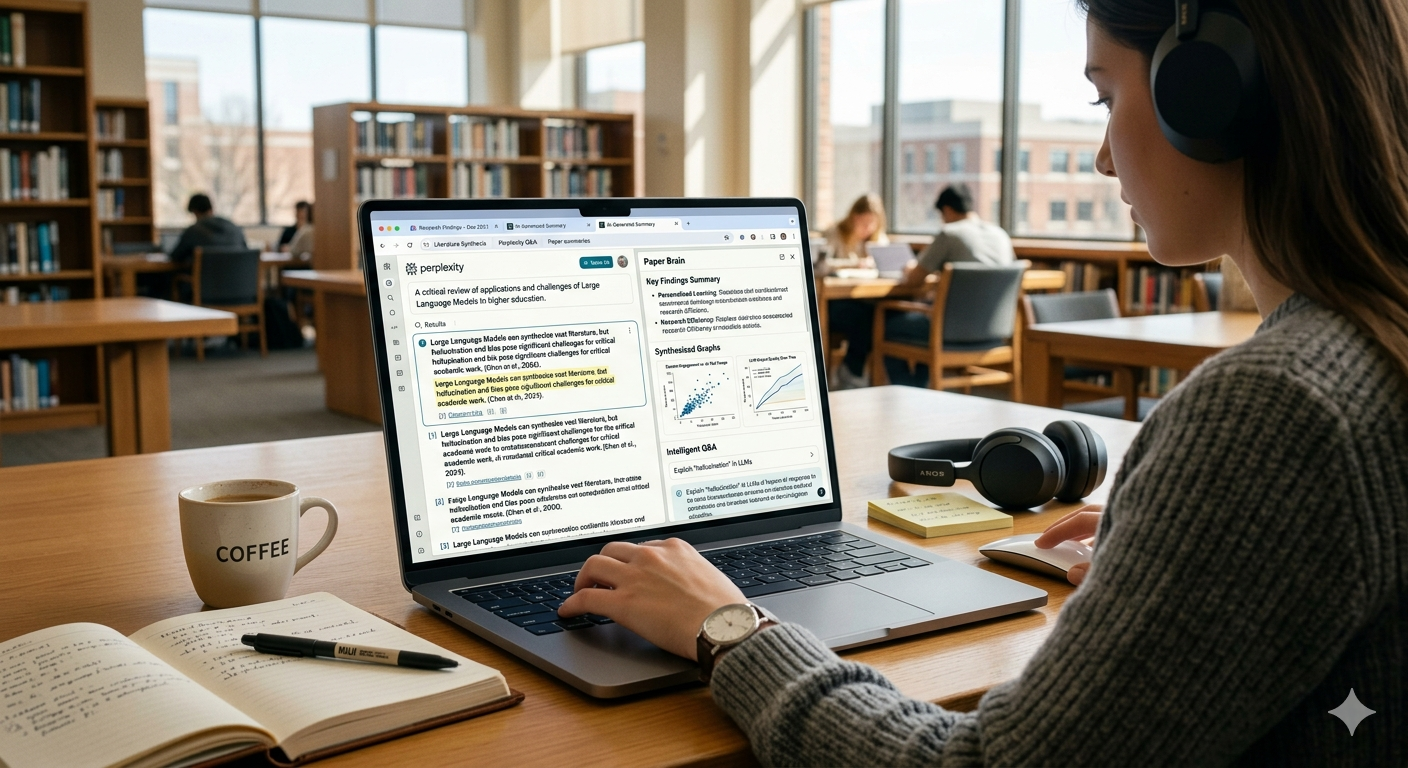
Perplexity (free + Pro) — The best general-purpose AI search for students right now. It cites its sources, which matters. Ask it "what's the current consensus on X?" and you get a referenced overview, not a hallucinated summary. The free tier handles most research needs.
Elicit (free + paid) — Built for academic literature search. The key difference from regular search: you ask a question in plain English, and it finds papers that address that question rather than matching keywords. Genuinely useful for lit reviews.
Consensus (free + paid) — Similar to Elicit, but focused on surfacing whether specific claims are supported by research. Good for checking whether a thing you've heard is actually backed by evidence.
Google Scholar (free) — Not AI, but foundational. If you're not using it, start. Works better when you know the terminology in your field.
A note on ChatGPT and Claude for research: both are useful thinking partners, but neither reliably cites sources. Use them to understand concepts and form questions; use Perplexity or Elicit to actually find sources.
Note-Taking (Lectures, Readings, Study Sessions)

Notion (free for personal use) — The most popular note-taking tool at universities for a reason. It handles class notes, project pages, reading trackers, and group wikis well. The free personal plan is sufficient for most students.
Obsidian (free) — Local-first, meaning your notes live on your device. The linking system — connecting notes bidirectionally — is excellent for students who want to build a personal knowledge base over years, not semesters. A steeper learning curve but rewarding if you commit. Not sure which fits you? See our Notion vs Obsidian comparison.
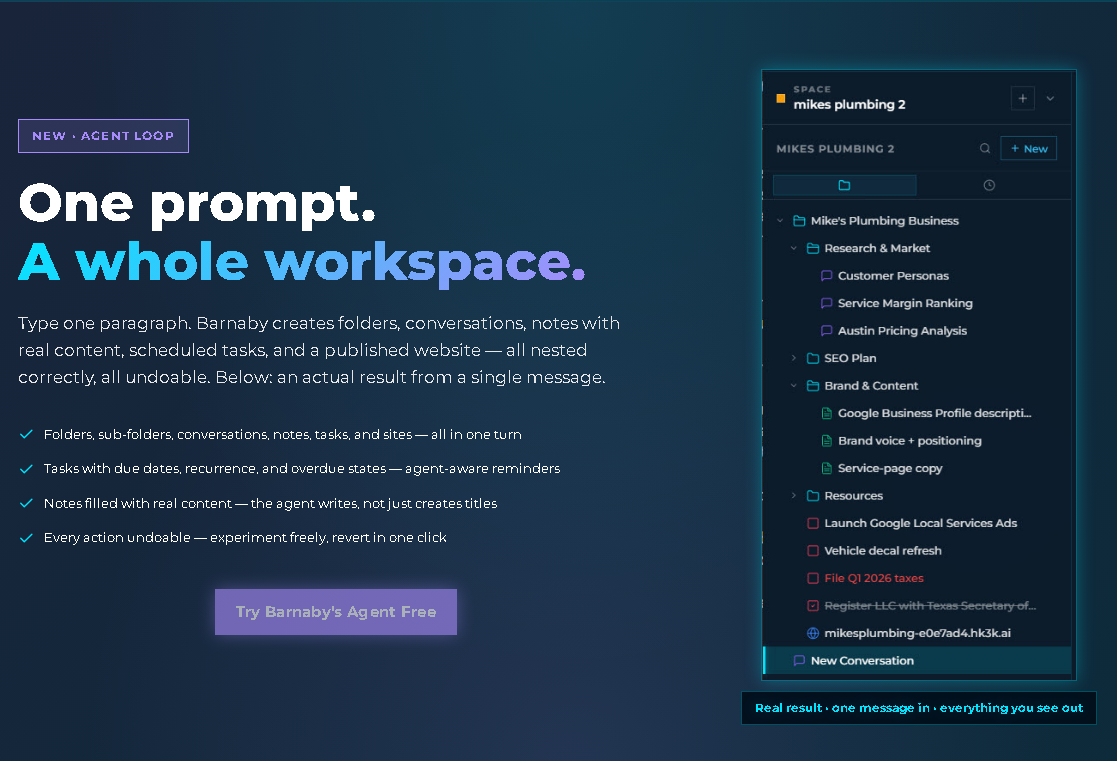
hk3k (free) — An AI workspace where lecture notes, readings, study conversations, and paper drafts all live in the same place. The agent loop is the distinctive feature: tell it about your paper or project, and it builds the workspace for you. Folders for sources, sections for drafts, tasks for deadlines — and every action is undoable before you confirm. It also imports your ChatGPT and Claude conversation history, so months of study sessions become searchable rather than lost. Connects to Notion via OAuth for students already using it. Worth trying if your current setup involves hunting for things across five different apps. More on how it fits below.
OneNote (free with a school account) — Frequently already provided by universities through Microsoft 365 licenses. Reliable and familiar; not flashy, but gets the job done.
For iPad or handwriting-first workflows: GoodNotes and Apple Notes are both worth considering.
Writing Help
ChatGPT (free + Plus) — Strong for drafting, editing, brainstorming, and quick explanations. The free tier is fast and capable enough for most student writing tasks.
Claude (free + Pro) — Particularly good for longer-form writing where voice and nuance matter. Many students find it produces prose that's easier to edit into their own voice than ChatGPT's output. Worth having both available and using each where it excels. If you're also creating content outside of school, check out our AI tools for content creators guide.
Grammarly (free + Premium) — The reliable grammar and style layer. Student discounts are usually available for the premium plan. Run anything important through it before submitting.
Hemingway Editor (free + paid) — Catches readability problems: sentences that are too long, passive voice, unnecessary adverbs. Useful as a final pass before submission.
Lecture Recording & Transcription
Otter.ai (free tier; education plan available) — Records lectures and produces searchable transcripts. The free tier has a minute cap per month, which covers light use. The education plan extends this significantly.
Notta (free + paid) — Similar functionality to Otter.ai. Worth comparing if you record frequently.
iPhone Voice Memos with transcription (free) — Apple added transcription to Voice Memos in recent iOS versions. For straightforward lecture capture, it's genuinely good enough and requires no new app.
Always check your professor's policy on recording before you record. Many have explicit stances; some prohibit it.
Citation Management
Zotero (free, open source) — The gold standard. Works with Google Docs, Microsoft Word, and LaTeX. Browser extension captures citations from nearly any database automatically. If you're in a research-heavy field and you're not using a citation manager, start now — the students who wait until grad school universally wish they'd started earlier.
Mendeley (free) — Strong for STEM fields, particularly for managing large PDF libraries with annotation.
EndNote — Your university may provide it free through the library. Older but powerful; better for certain workflows and disciplines.
Math, Science & Coding
Wolfram Alpha (free + Pro student) — Symbolic math, science constants, unit conversions, step-by-step problem solving. Indispensable for STEM students.
Photomath (free + paid) — Solve math problems from a photo of your handwritten work. Useful for checking solutions and understanding where you went wrong.
Khan Academy AI (free) — Tutoring and explanations across subjects. Good for fundamentals; the AI tutor asks guiding questions rather than just giving answers.
GitHub Copilot (free for students with GitHub Education) — If you're coding, Copilot is a genuine productivity multiplier. The GitHub Student Developer Pack provides it free.
Studying & Memorization
Anki (free, open source) — Spaced repetition flashcards. The science behind it is solid: reviewing material at increasing intervals is the most efficient way to retain information long-term. The interface is dated but the methodology is unmatched.
Quizlet (free + paid) — More beginner-friendly than Anki, with AI-powered question generation. Good for courses where you need to memorize facts, terms, or concepts quickly.
Brisk Teaching (free for students) — Generates quizzes from any text you paste in. Useful for turning lecture notes or textbook passages into practice questions with minimal effort.
Project Planning
Notion (free) — Assignment tracking, group project pages, shared team wikis. Already covered above but worth mentioning again for the planning use case.
hk3k (free) — The agent loop handles project setup in seconds: tell it about your paper, thesis chapter, or group project, and it builds the workspace. Folders for sources, tasks for deadlines, draft sections, and every action is undoable before you confirm. For projects that involve lots of reading and writing, having the workspace auto-structured is genuinely useful.
Todoist (free + paid) — Simpler task management for students who want a clean to-do list without workspace features.
Google Calendar (free) — For deadline visibility. Obvious, but obvious because it works.
A Free Stack You Can Build for $0
Most students don't need to pay for any AI tool. A complete free stack:
- ChatGPT (free tier) — drafting, editing, quick explanations
- Perplexity (free tier) — research with cited sources
- hk3k (free, no credit card) — workspace where everything lives together
- Notion (free for personal use) — class notes and assignments
- Zotero (free, open source) — citation management
- Otter.ai (free tier) — lecture transcription within the monthly cap
- Anki (free, open source) — spaced repetition flashcards
That's $0/month and it covers the major student workflows. The advice on upgrades: only pay for a tool when you hit a specific limit you actually feel. Don't upgrade speculatively.
A Sample Stack — One Grad Student's Research Workflow
Here's what this looks like in practice. A sociology PhD student working on a dissertation chapter might:
- Use Elicit to find papers on their research question — framed as a plain-English question, not a keyword string.
- Save references to Zotero as they read, using the browser extension.
- Set up their workspace in hk3k — tell the agent: "Set up a Space for my dissertation chapter on [topic]." The agent creates folders for sources, a section for lit-review notes, draft sections, and a task list with writing milestones.
- Import existing ChatGPT and Claude conversations into hk3k. Six months of brainstorming sessions on the topic become searchable rather than buried in chat history.
- Connect Notion via OAuth — their advisor's lab already uses Notion, and existing reading notes sync over automatically.
- Draft in Claude for nuanced, longer-form writing; use ChatGPT for faster turnaround on shorter sections; run Grammarly before submitting anything.
- Use hk3k's AI search to find something they read three months ago — a specific framing of an argument they half-remember — without hunting through folders or scrolling through chat history.
The workspace is the connective tissue. Everything lives in one place; the student stops losing track.
Where hk3k Fits for Students
To be specific about what hk3k does and doesn't do:
What it is: An AI workspace where your tools, conversations, notes, and drafts converge. Not a transcription tool or citation manager, but the connective layer that makes those tools less fragmented.
The agent loop: Describe your project in plain English. The agent builds the workspace structure for you — no manual folder creation, no setting up task lists from scratch. Particularly useful at the start of a new paper or semester.
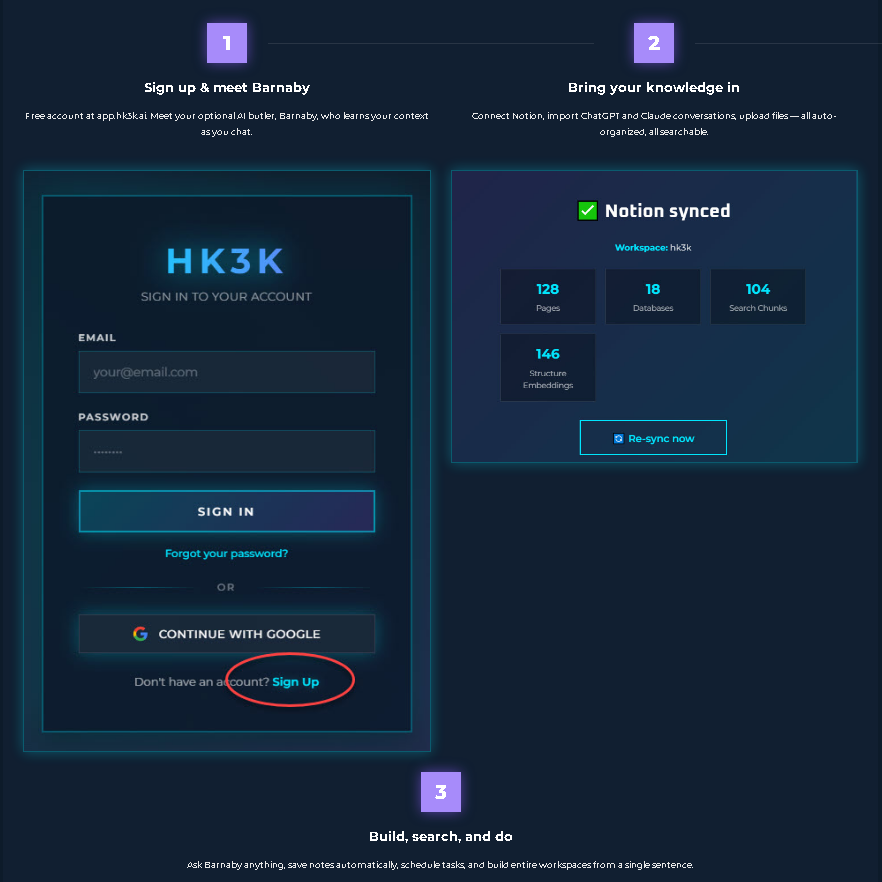
ChatGPT and Claude history import: Every study session you've had, every brainstorming conversation, becomes searchable. Students consistently lose useful AI conversations by closing a browser tab. hk3k prevents that.
Notion integration: OAuth connection, so reading notes and class pages you've built there don't have to be migrated or duplicated.
Personalized AI search: Find a source you read weeks ago without remembering the file name or which folder you put it in. Describe what you remember; search surfaces it.
Telegram bot: Capture ideas on your phone. Text the bot a thought during your commute; it lands in your workspace.
hk3k is free at app.hk3k.ai — no credit card, and free handles everything students need.
Using AI Ethically in School
This section exists because students are genuinely searching for guidance on this — not because you need to be lectured.
Read your university's AI policy. Most institutions now have specific guidance, not just vague statements about plagiarism. It's worth 10 minutes to actually read it before an assignment where it matters.
Be honest with yourself about whose work it is. The useful self-test again: Could I defend every line of this in office hours? If an AI wrote an argument you can't articulate or defend, it's not your work regardless of whether the detector flags it.
When in doubt, disclose. "I used Claude for a first-pass outline and restructured it significantly" is a transparent statement most professors respect in 2026. It's also honest, which matters beyond the grade.
Don't use AI to read primary sources for you. This bears repeating because it's the most tempting shortcut and the most costly one. The reading is the learning. Summaries give you the shape of an argument; reading the source gives you the texture, the ambiguities, the things worth actually engaging with.
AI for editing and brainstorming is widely accepted. AI as your final voice is widely contested. Know which side of that line you're on per assignment, and make a conscious call rather than a lazy one.
FAQ
Will my professor know I used AI?
AI detection tools exist and universities use them, but they're unreliable in both directions — they miss AI-generated content and flag human writing as AI. Transparency is a much more defensible position than trying to stay below the detection threshold.
Is ChatGPT or Claude better for school?
Both work well. Claude tends to handle long-form papers, nuanced arguments, and complex editing better. ChatGPT is faster for short tasks, quick explanations, and iteration. Worth having access to both and using each where it excels.
Do I need to pay for AI as a student?
No. The free stack outlined above covers most student workflows. The free tiers of ChatGPT, Perplexity, and hk3k are sufficient for the majority of use cases. Pay only when you hit a specific limit.
Can I use hk3k for free?
Yes — free, no credit card. app.hk3k.ai.
What's the most underrated tool on this list?
Probably Zotero. Most undergrads skip citation management entirely, and most grad students wish they'd started using it in undergrad. The earlier you build the habit, the more useful your reference library becomes over time.